Personnel Costs
The Personnel Costs module helps you build a month-by-month forecast of the cost and cash-flow impact of your workforce. Instead of using one average payroll amount, you model the people who are active in each month, their employment type, gross wage or monthly fee, employer social-security contribution, holiday pay, 13th month, raises and perks.
Monitr then separates two views that are easy to confuse:
- personnel cost — the expense recognised in each month;
- cash flow — the month in which the wage, fee, holiday pay, 13th month or perk is paid.
This distinction matters when holiday pay or a 13th month is accrued throughout the year but paid in one month. The module uses a general Balance Sheet debt mapping to carry that timing difference into the forecast.
Use Personnel Costs for employees, consultants and future hires that you want to model person by person. Use Simple Budget for a high-level payroll amount without employee logic. Use Project Revenue separately to model billable capacity and rates. Use Adjusting Entries to correct booked actuals; Personnel Costs does not create accounting correction entries.
What the module covers
| Area | What you configure | What Monitr calculates |
|---|---|---|
| Budget range | First and last budget month | Months in which personnel assumptions can produce output |
| Global contract terms | 13th month, social security, holiday pay and payout method | Defaults for new payroll employees |
| Raises | Dated percentages for Payroll and Freelance | Wage or fee changes from the selected month |
| Departments and people | Department, person, type and active period | Monthly headcount and active workforce |
| Wage or fee | Monthly gross wage for an Employee; monthly fee for a Consultant | Monthly wage or consulting cost |
| Perks | Monthly or one-time additional amounts | Cost and cash flow in the selected months |
| P&L mapping | One reporting mapping and description per person | Reporting line on which that person's costs appear |
| Debt mapping | One Balance Sheet mapping and description for the module | Timing difference for accrued holiday pay and 13th month |
| Result | Read-only charts before finishing | Cost, cash flow, headcount and average cost |
Before you start
Prepare the following decisions before opening the wizard:
- The scenario in which the personnel budget belongs.
- The first and last budget month.
- Whether to start manually, from a previous Personnel Costs budget or from Nmbrs.
- The standard employer social-security percentage.
- Whether payroll employees receive a 13th month.
- The holiday-pay percentage and whether it is paid in one month or spread.
- Global Payroll and Freelance raise assumptions.
- The Balance Sheet mapping for accrued holiday pay and 13th month.
- The departments, people, active periods, wages or fees and perks.
- The P&L mapping and budget-account description for every person.
Percentages, payout months, account numbers and analytical axes are entity-specific assumptions. Do not copy a Belgian example blindly into another entity. A value shown in an example is not a Monitr-wide default.
Create a Personnel Costs budget
- Open Forecasts and expand the scenario in which you want to work.
- Click Add a budget inside the scenario.
- In Add a new or existing budget, choose the appropriate route:
- Link keeps an existing budget version connected;
- Copy uses an existing version as an independent starting point;
- Create a new budget starts a new module.
- Select Create a new budget when you want to configure a new workforce forecast.
- Check the selected scenario and choose Personnel Costs under scenario budgets.
- Monitr opens a five-step wizard: Introduction, Configuration, Employees, Mappings and Result.
If you are replacing or extending an earlier personnel budget, first decide whether Copy, Start from previous budget or Copy configuration from previous budget best matches the intended scope. They do not copy the same information.
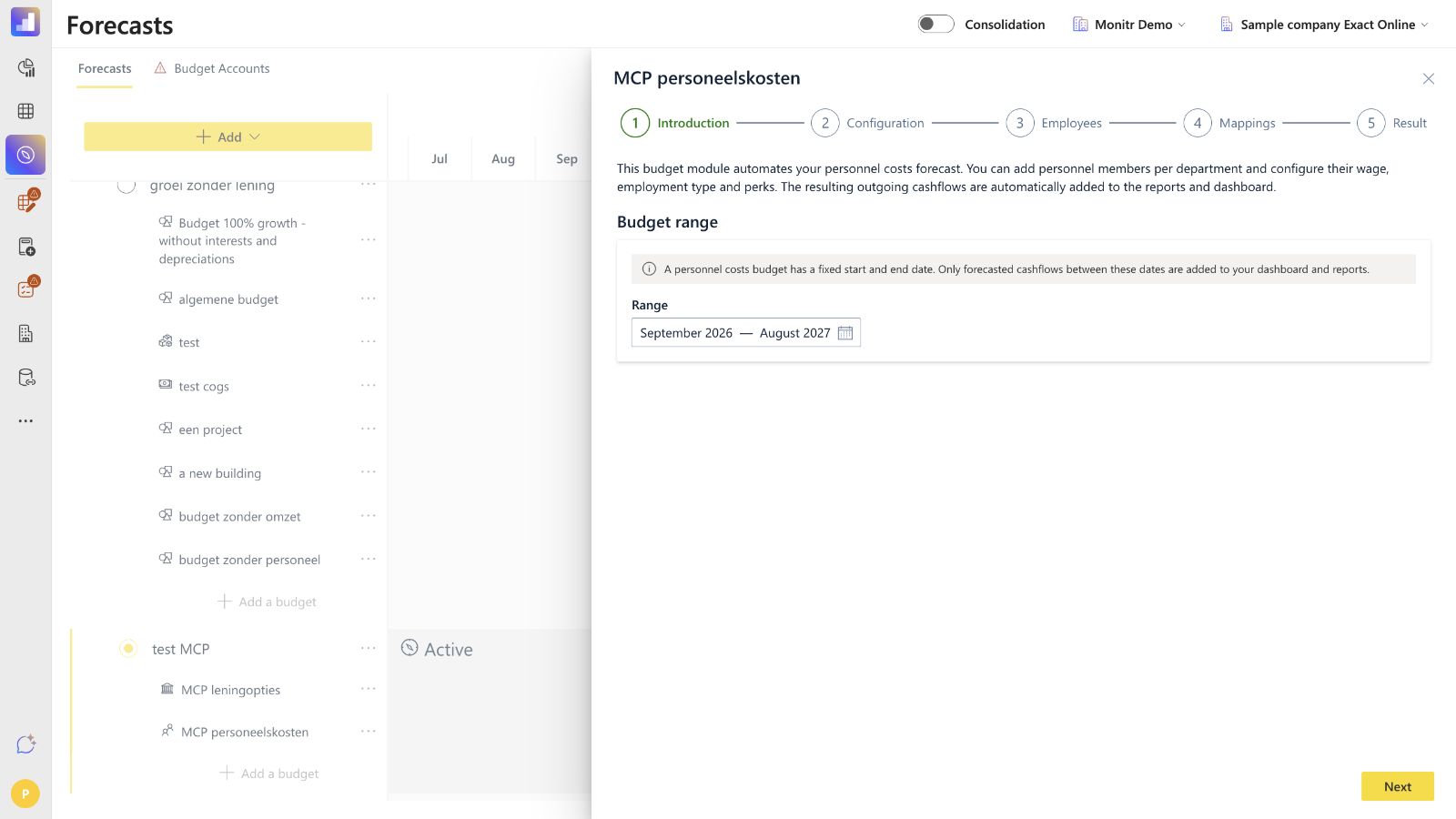
Step 1 — Introduction and budget range
The introduction explains that the module forecasts outgoing personnel cash flows and sends the result to reports and the dashboard.
Under Budget range, select the first and last month of the budget. The range is fixed for this budget version. Only forecast output within these dates is included in the dashboard and reports.
Employment periods and perk periods are entered at month level and must fall inside the budget range. When a source employment period starts earlier or ends later, Monitr clamps the active period to the budget range.
Before clicking Next, verify that the range covers:
- every planned employee and consultant month;
- the selected holiday-pay month;
- December when a 13th-month payment needs to appear;
- every dated raise;
- all one-time and recurring perks.
Step 2 — Configuration
Configuration contains the organisation-wide starting assumptions for this personnel budget. These settings become defaults for people that you add afterwards. Existing people are not automatically kept in sync with every change to the global settings.
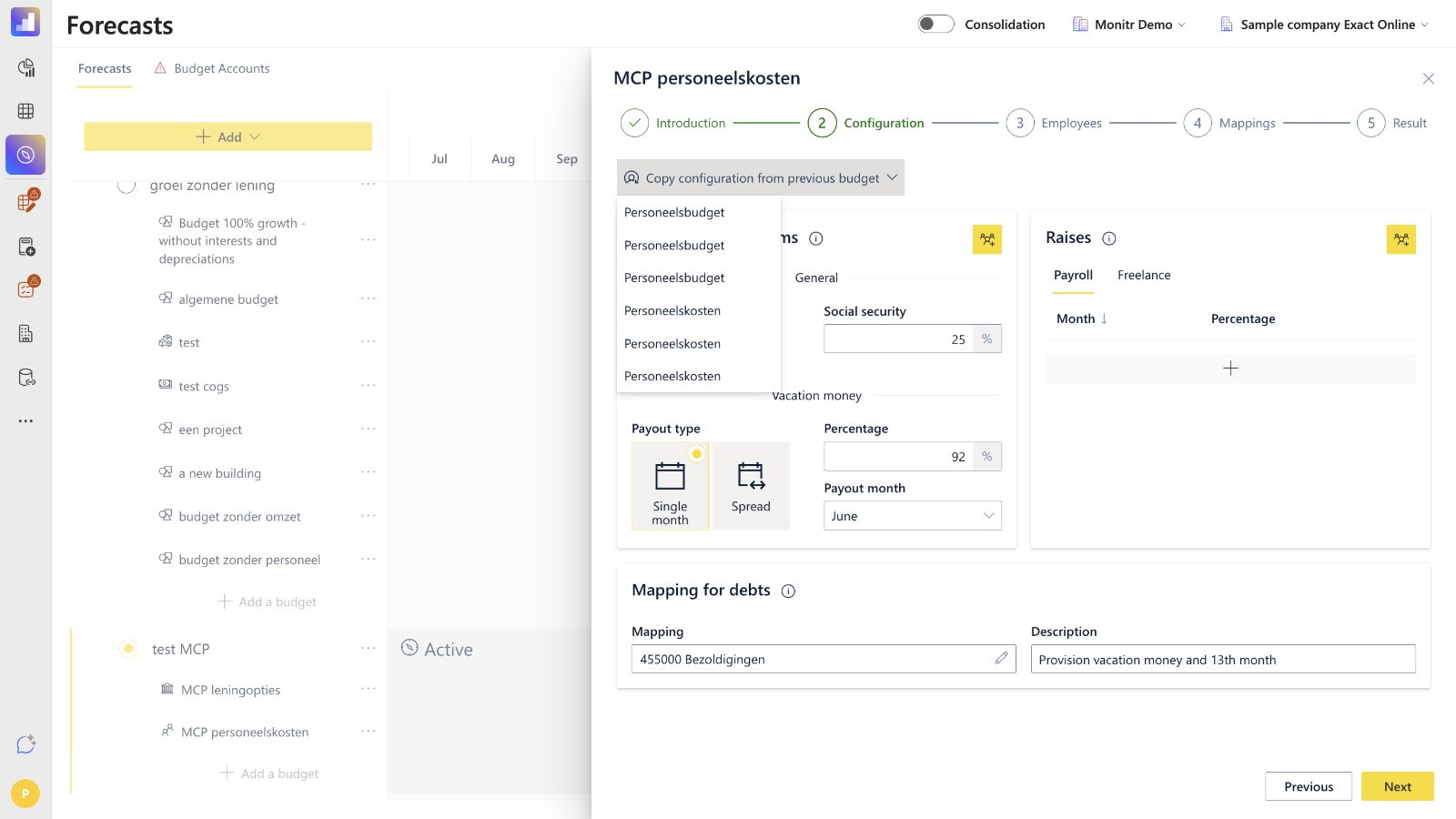
Copy configuration from a previous budget
Use Copy configuration from previous budget to load the configuration of another Personnel Costs budget version. This is useful when contract terms, raises and the debt mapping remain broadly unchanged.
Always review the copied values against the new budget range and current payroll policy. A copied payout month, percentage or mapping may no longer be appropriate.
Default contract terms
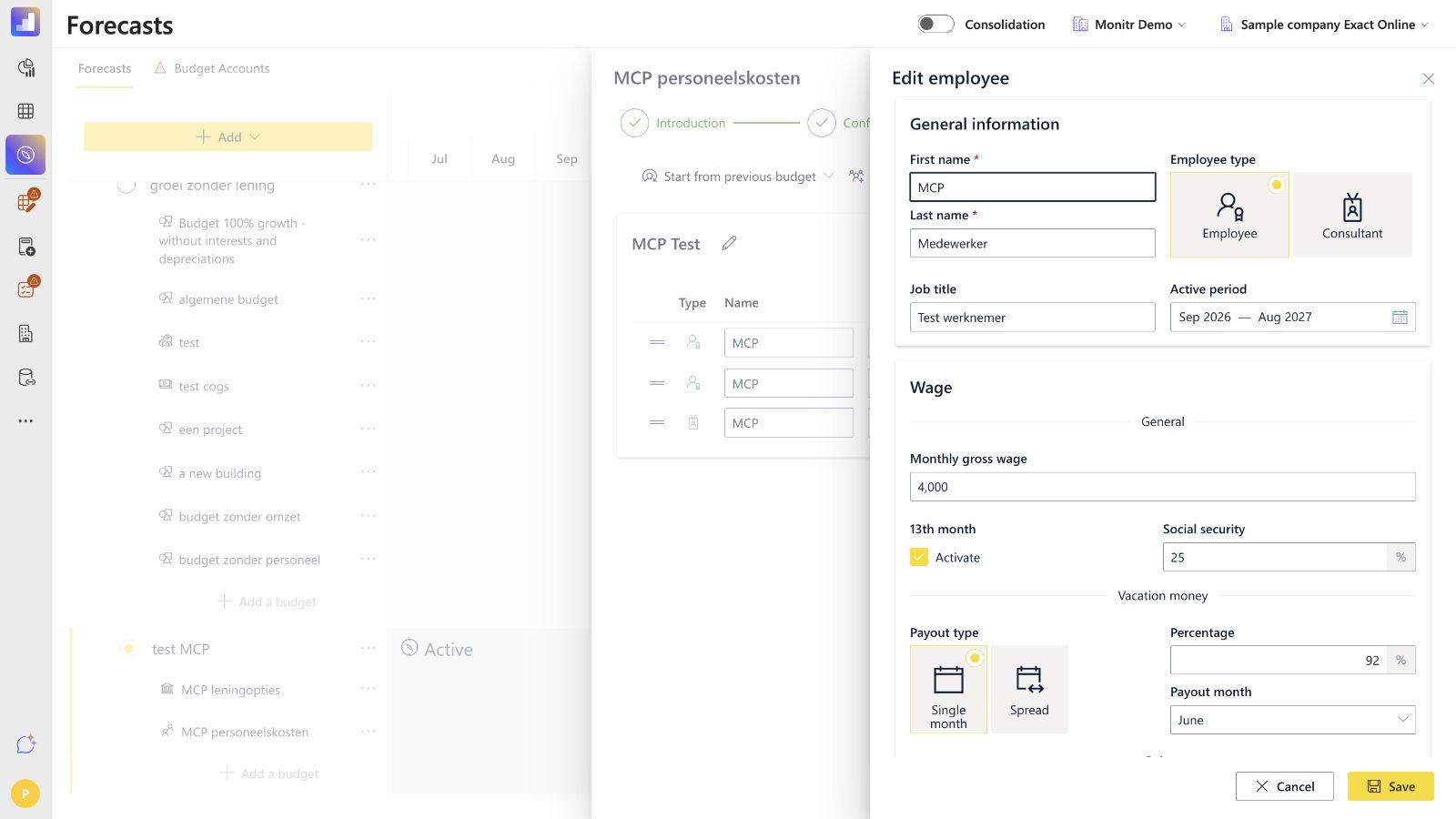
The current configuration screen contains:
- 13th month — Activate: enables or disables the 13th-month assumption for payroll employees;
- Social security %: employer contribution on top of the gross monthly wage;
- Vacation money — Payout type:
- Single month pays the annual holiday amount in one selected month;
- Spread pays the accrued amount throughout the year;
- Vacation money — Percentage: the percentage applied to gross wage;
- Payout month: the selected cash-payment month when Single month is active.
These fields apply to Employee type people. Consultants use a monthly fee and dated raises; they do not receive the employee-specific social-security, holiday-pay or 13th-month settings in this module.
Raises
Raises are maintained as dated month-and-percentage rows in two separate tabs:
- Payroll for Employee type people;
- Freelance for Consultant type people.
Add a row for every raise date. A raise takes effect from the selected month. Review duplicate months and overlapping assumptions before continuing.
The current UI uses the labels Payroll and Freelance in the global configuration, while the employee side panel uses Employee and Consultant as the person types.
Mapping for debts
Select a Balance Sheet mapping and enter a description for the debt budget account. This mapping is used for the timing difference created by accrued holiday pay and the 13th month.
In Belgian charts of accounts, a remuneration or wage-payable account is often found in the 45-series, but the correct reporting line and account depend on the entity. Choose the mapping from the active reporting structure; never infer it from an example account number.
Next remains unavailable when the debt mapping or its description is incomplete.
Apply configuration carefully
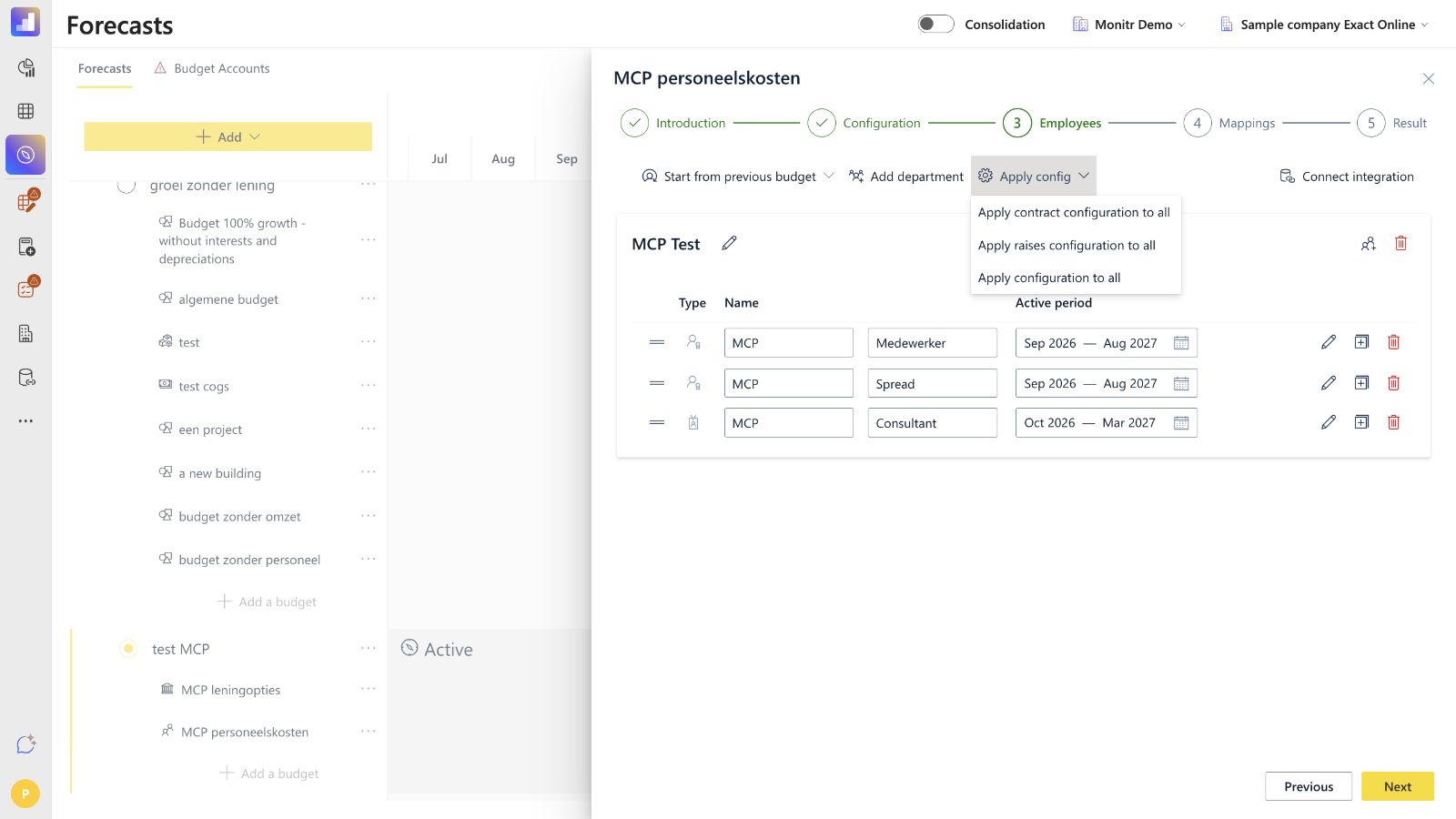
After people exist in Step 3, use Apply config to copy the global configuration to them. The menu contains three different bulk actions:
- Apply contract configuration to all — copies the standard employee contract terms;
- Apply raises configuration to all — copies the Payroll or Freelance raise schedules to the matching person types;
- Apply configuration to all — applies both contract terms and raises.
These actions overwrite the affected individual settings. Recommended order:
- complete the global configuration;
- add, import or synchronise people;
- run the required bulk action once;
- re-enter individual exceptions;
- review every exception before leaving Employees.
Do not use a bulk action after configuring individual exceptions unless you deliberately want to replace them.
Step 3 — Employees
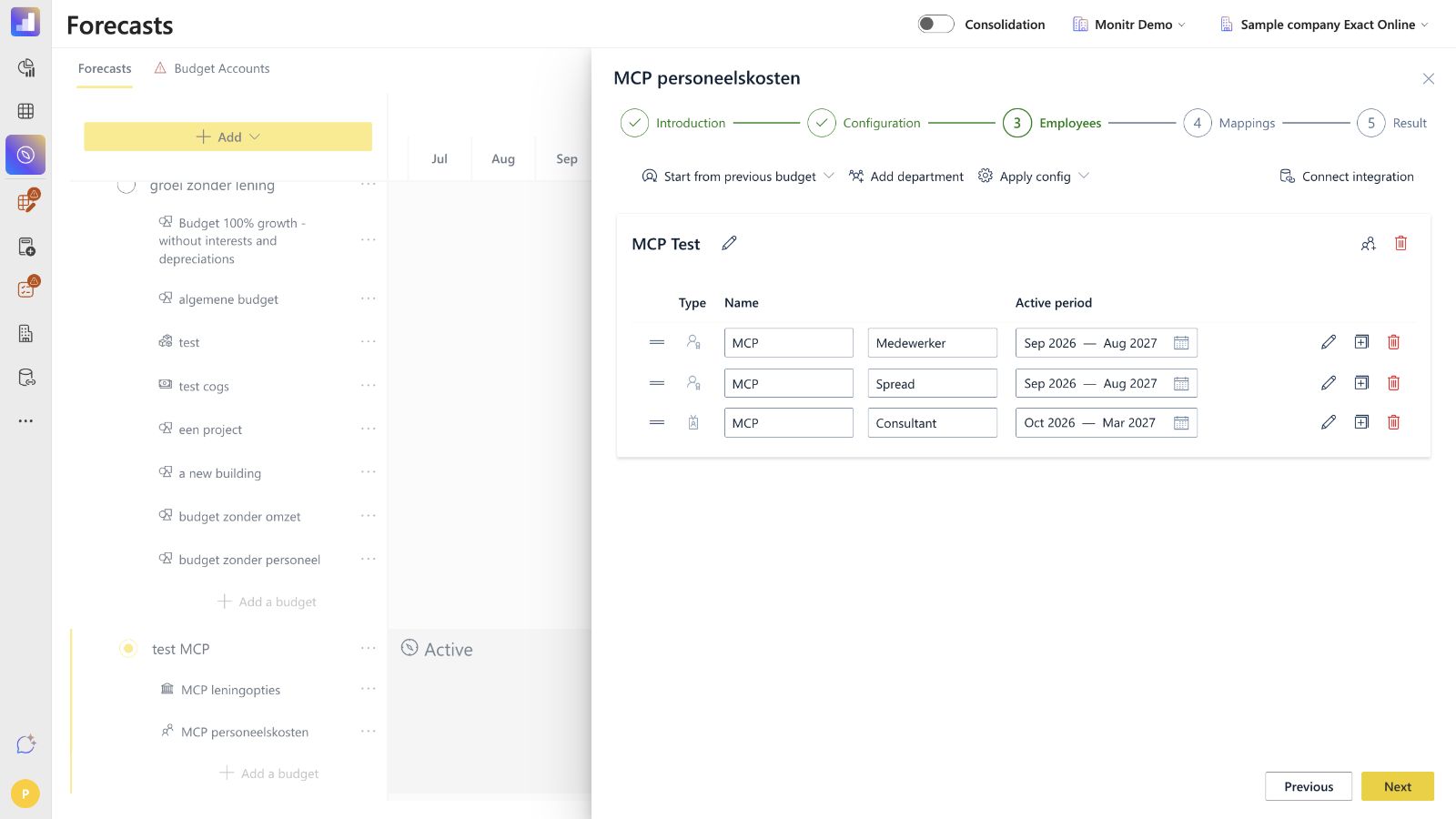
Employees and consultants are organised into department cards. Existing staff and future hires use the same person model; there is no separate planned-position type. A future hire is simply a person with a future active period.
Command bar
The Employees command bar can contain:
- Start from previous budget — copies departments and people from another Personnel Costs version and fits their periods to the new range;
- Add department — creates a department card;
- Apply config — applies global contract terms, raises or both to existing people;
- Connect integration — starts the HR-integration route when no connection is configured;
- Sync with Nmbrs — opens the employee-sync flow when Nmbrs is connected.
Department cards
Each department card contains its people. From the card you can:
- rename the department;
- add a person to that department;
- drag a person to another department;
- edit, duplicate or delete a person;
- delete a department after resolving any people still assigned to it.
Every department must contain at least one valid person before the wizard can continue.
Employee list
Each row shows the type, first name, last name and active period. First and last name can be edited inline. The action icons open the detailed side panel, duplicate the person or delete the person.
The active period is one month-level range, not separate start-date and end-date fields. It is automatically limited to the budget range.
The person's budget-account description initially follows the first and last name. After you edit that description manually in Step 4, Monitr keeps the manual label instead of continuing to rename it automatically.
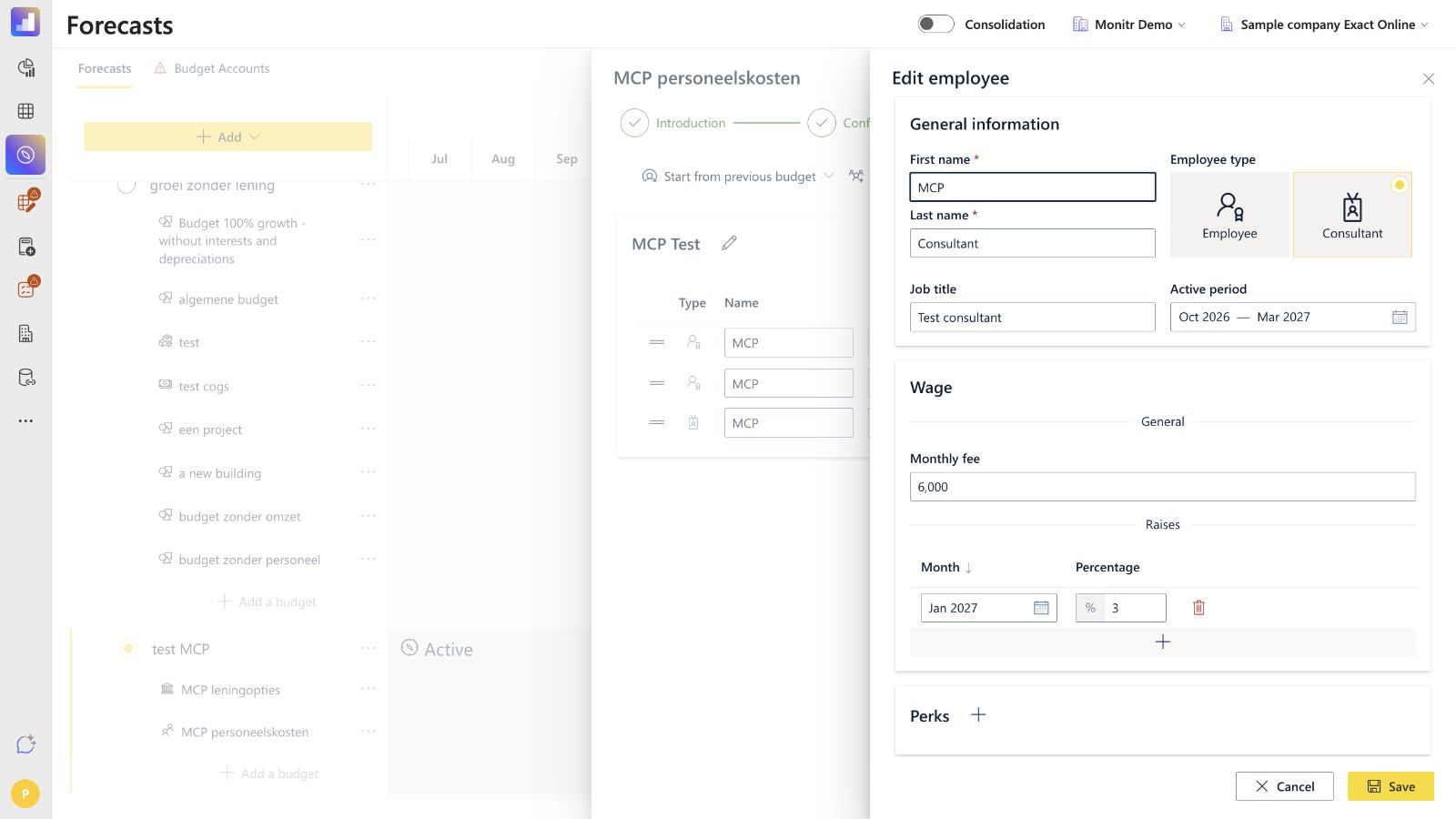
Employee side panel — general information
Open Edit to configure:
- First name — required;
- Last name — required;
- Employee type:
- Employee for payroll staff;
- Consultant for freelance staff;
- Job title — optional;
- Active period — required month range within the budget period.
Switching the employee type changes the wage fields shown below.
Employee type — wage settings
For an Employee, configure:
- Monthly gross wage;
- 13th month activation;
- Social security %;
- Vacation money payout type, percentage and payout month;
- dated Raises;
- optional Perks.
New employees inherit the defaults available at the time they are created or when a bulk Apply config action is run. They can then be adjusted individually.
Consultant type — fee settings
For a Consultant, configure:
- Monthly fee;
- dated Raises;
- optional Perks.
Personnel Costs does not calculate a consultant cost as days worked multiplied by a daily rate. The supported driver is a fixed monthly fee, adjusted by raises. If daily rate and billable capacity are needed for revenue planning, configure them separately in Project Revenue.
Perks
Use perks for additional amounts such as a car allowance, phone subscription or signing bonus. Each perk requires:
- a name;
- an amount;
- a payment type:
- Monthly for every active month in the selected range;
- One time for one selected month;
- the applicable month or period.
Perks follow the person's P&L mapping. The wizard does not expose a separate reporting mapping per perk.
Important validation gap — zero amounts
A new Employee or Consultant can keep a monthly gross wage or monthly fee of zero. The wizard may still continue when the other required fields are valid, and the result chart does not necessarily warn that the person produces no cost.
Before leaving Employees, review the following.
- monthly gross wage or monthly fee is non-zero when a cost is expected;
- active period is correct;
- employee-specific social security, holiday pay and 13th month are correct;
- raises start in the intended month;
- perk names, amounts and periods are complete;
- individual exceptions still exist after a bulk Apply config action.
Step 3 completion rules
Before Next is available, check that:
- at least one department exists;
- every department contains at least one person;
- all required first and last names are filled;
- every active period is valid and inside the budget range;
- every perk has a name and valid period;
- there are no unresolved validation messages.
Nmbrs integration
Nmbrs is the supported HR integration for the Personnel Costs module. It imports and matches workforce data so that the employee roster does not need to be rebuilt manually.
Set up the connection
- Open Organisation → Integrations → Personnel Costs.
- Select the entity.
- Click Authenticate or Connect integration.
- Sign in to Nmbrs and authorise access.
- Select the Nmbrs company to link.
- Return to the Personnel Costs wizard and open Sync with Nmbrs.
Sync and match people
The sync modal uses three areas:
- Nmbrs people, grouped by department, with source information such as name, start date and wage;
- people already present in the Monitr budget;
- matched pairs.
Select one source person and one Monitr person, then match them. Previously matched people can be recognised by the integration ID. Remove a pair when it is incorrect. Unmatched Nmbrs people can be added as new people and departments.
Saving the sync updates the Nmbrs-controlled fields of matched people. This includes identity details, job title, employment period, monthly gross wage, perks and the integration ID. Treat the sync as an overwrite of those source-controlled fields: review the matched pairs before saving and recheck the employee list afterwards.
What Nmbrs does and does not supply
| Data | Nmbrs sync | Monitr responsibility |
|---|---|---|
| Person identity and integration ID | Imported/matched | Review the match |
| Department grouping | Used by the sync | Review or reorganise departments |
| First and last name | Imported | Review after sync |
| Job title | Imported when available | Complete when missing |
| Employment period | Imported and clamped to the budget range | Review forecast months |
| Monthly gross wage | Imported for matched payroll people | Review the forecast wage |
| Perks | Imported when exposed by the integration | Review amounts and periods |
| Social security % | Not imported as a forecast setting | Configure in Monitr |
| 13th month | Not imported as a forecast setting | Configure in Monitr |
| Holiday-pay percentage and payout | Not imported as forecast settings | Configure in Monitr |
| Raise assumptions | Managed as forecast assumptions | Configure and review in Monitr |
| Debt mapping | Not supplied | Configure in Monitr |
| P&L/analytical mapping and description | Not supplied | Configure in Monitr |
Do not describe the Nmbrs sync as importing employer contributions or total forecast personnel cost. Social security, holiday pay and the 13th month remain Monitr assumptions. After every sync, run the employee validation checklist and apply the intended defaults before re-entering individual exceptions.
Step 4 — Mappings
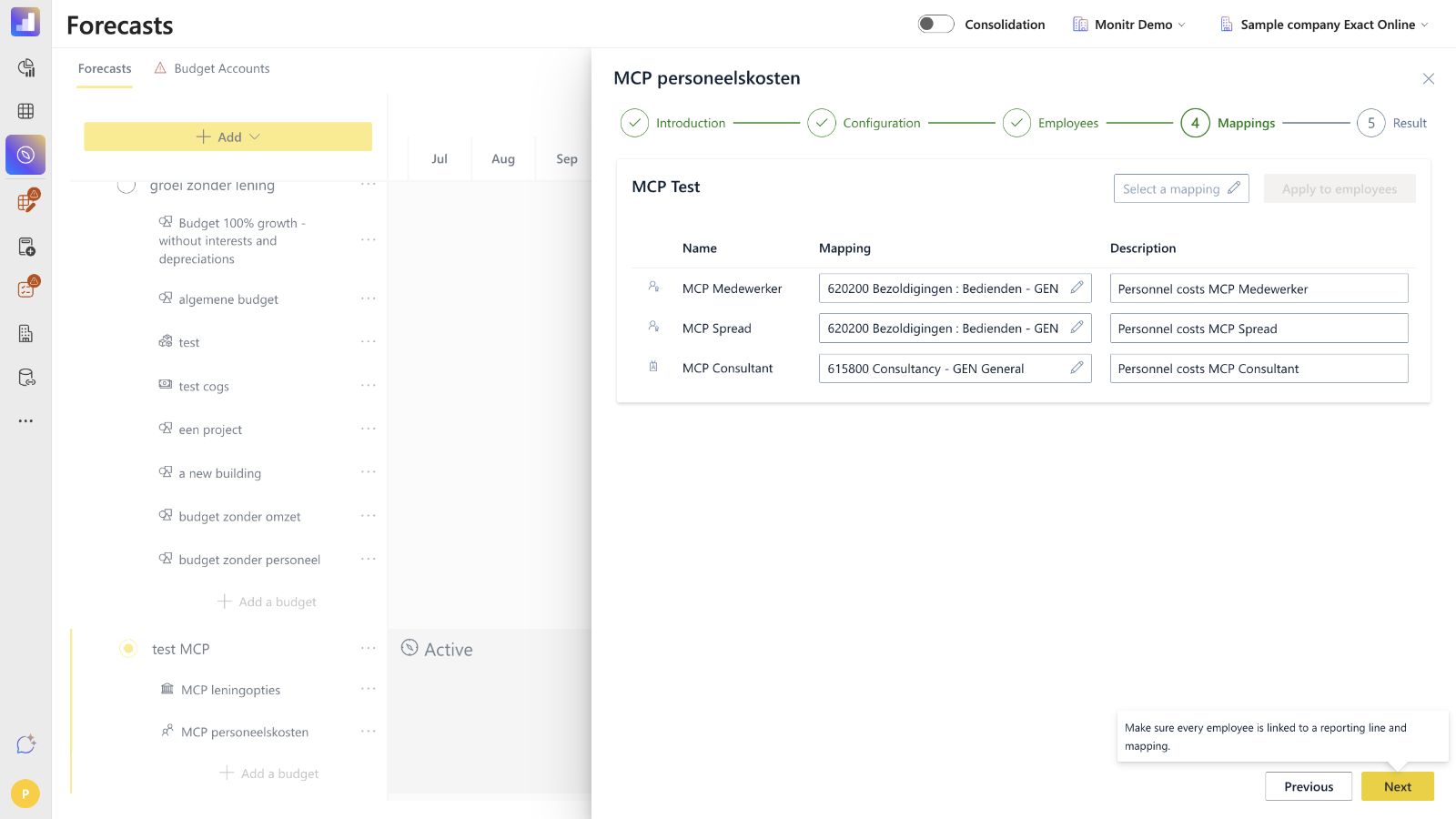
Step 4 determines where each person's total personnel cost appears in the Profit & Loss reporting structure.
Department-level bulk mapping
At the top of a department card, select a P&L mapping and click Apply to employees to copy it to the people in that department. Use this as a starting point when most people share a reporting line.
Per-person mapping
Every person row contains:
- a P&L mapping selector, including an analytical axis where applicable;
- an editable description used as the budget-account label.
After a bulk mapping, change exceptions individually—for example, map employees to payroll and a consultant to consultancy.
Mapping granularity
Each person receives one P&L mapping. Wage, social security, holiday pay, 13th month and perks are not separately mapped to different P&L lines inside this wizard. Perks also follow the person's mapping.
The general debt mapping from Step 2 is separate and belongs to the Balance Sheet timing difference for accrued holiday pay and the 13th month.
Next remains unavailable until every person has a valid mapping and non-empty description.
Step 5 — Result
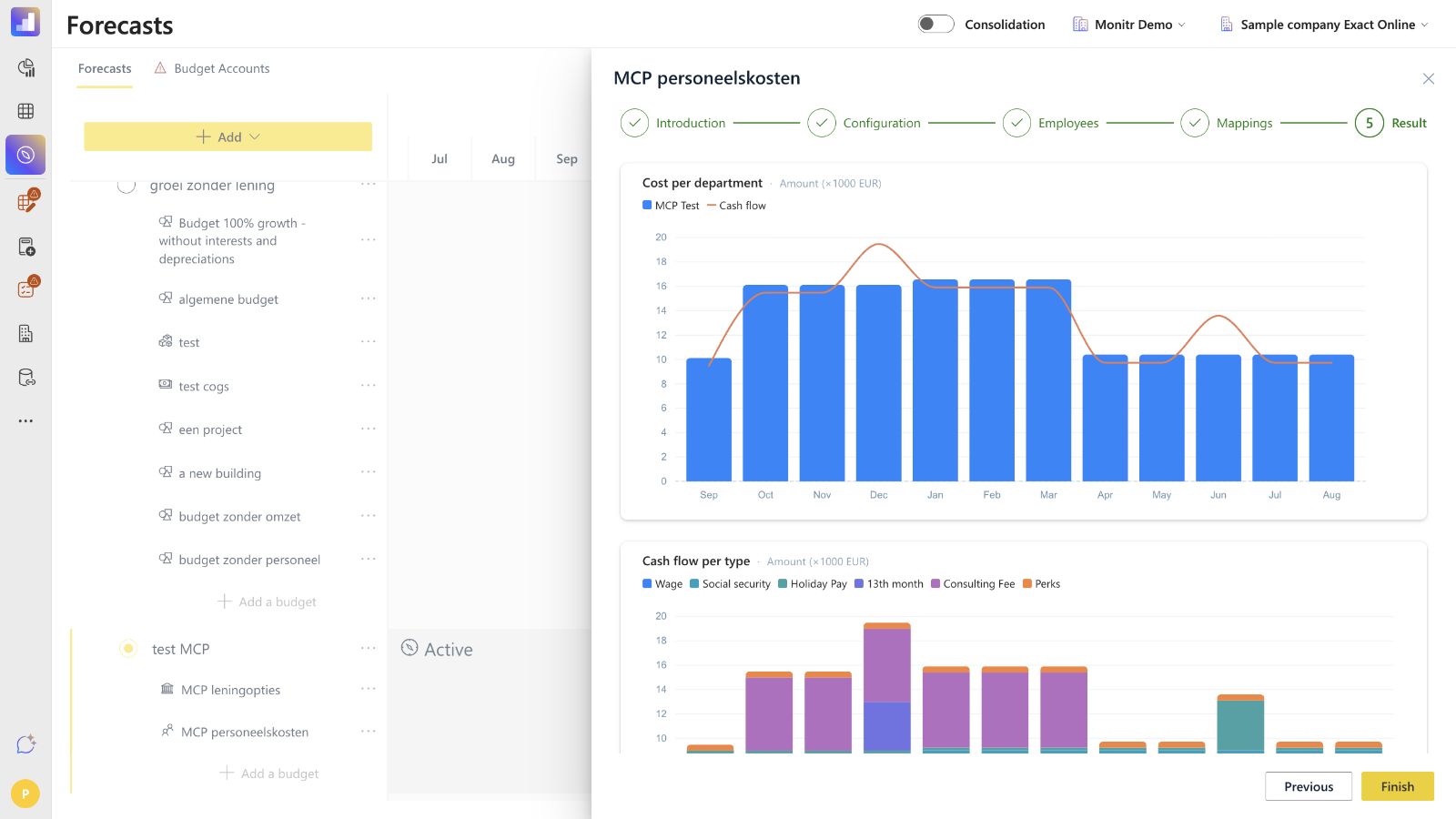
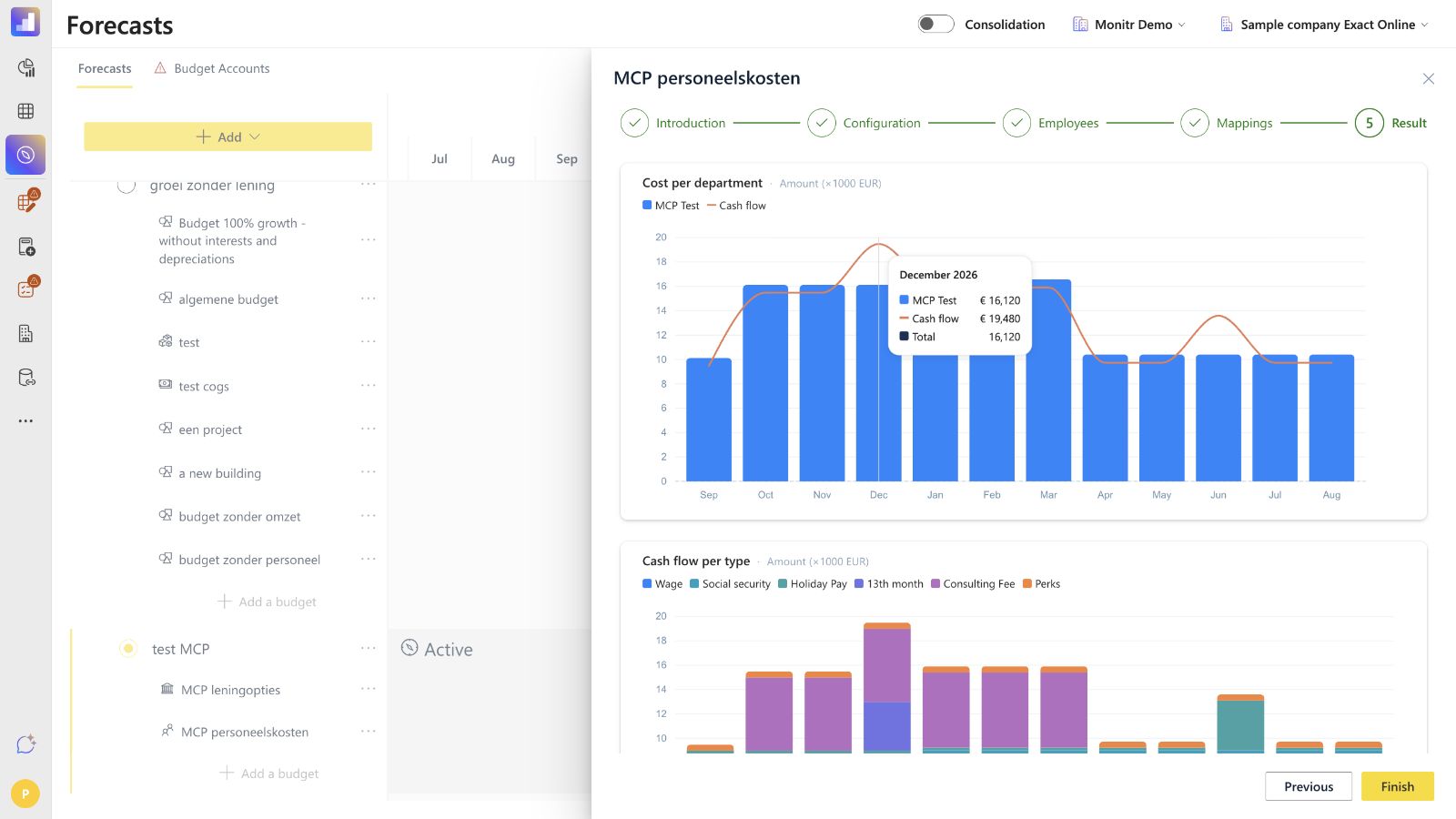
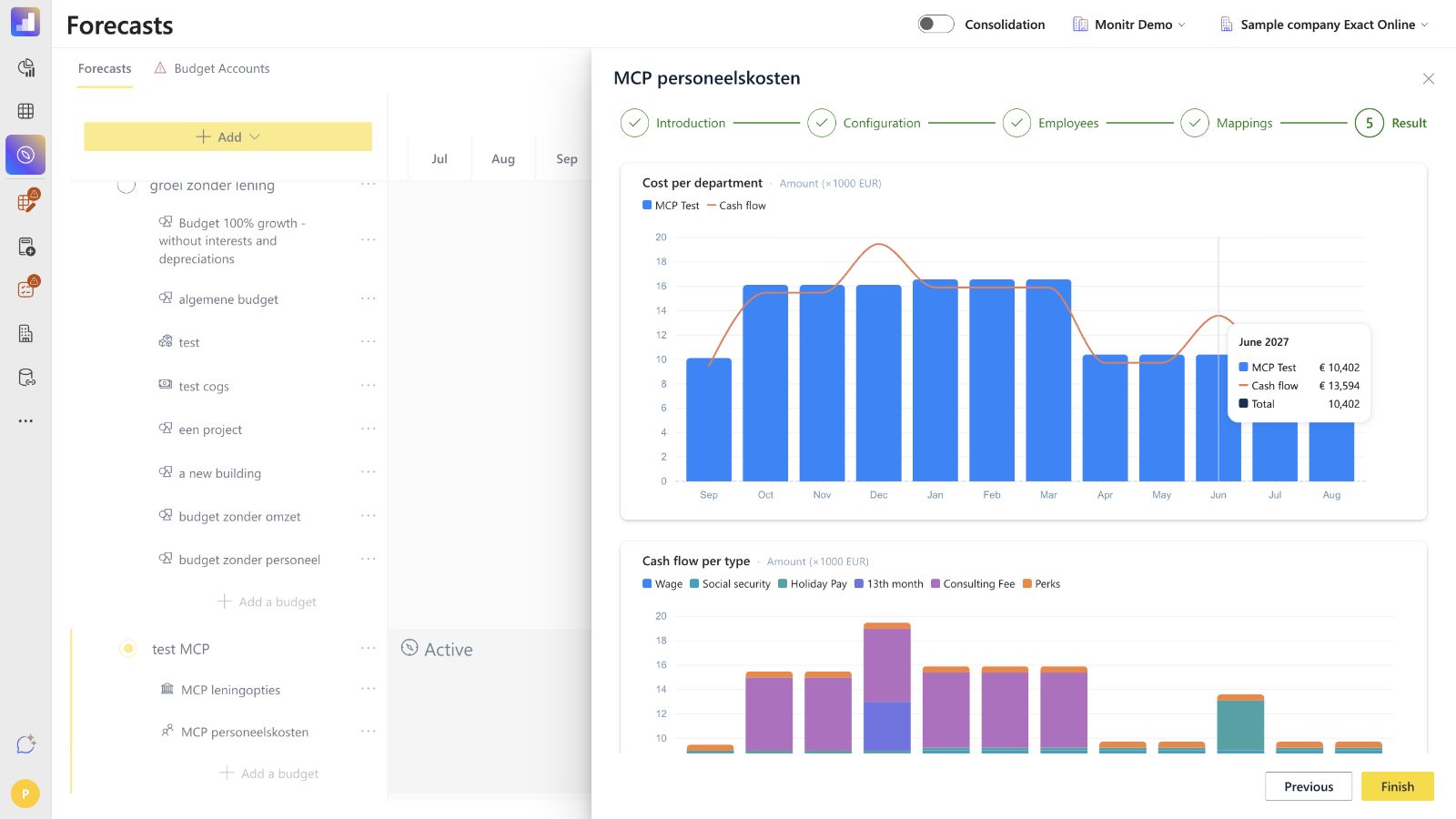
Result is a read-only preview. Use it to detect missing people, zero-cost people, unexpected peaks and mapping or timing errors before finishing.
The wizard preview contains four charts:
- Cost per department — monthly bars by department with a cash-flow line;
- Cash flow per type — monthly cash flow split into wage, social security, holiday pay, 13th month, consulting fee and perks;
- Headcount per department — active people per department and month;
- Average cost per department — average monthly cost per active person by department.
Review at least:
- new hires and leavers appear in the correct months;
- employees and consultants have non-zero amounts when expected;
- raises start in the correct month;
- December contains the intended 13th-month payment;
- a Single month holiday-pay configuration creates a cash-flow peak in the selected month;
- Spread holiday pay follows the expected monthly pattern;
- one-time perks appear once and monthly perks repeat only during their active period;
- cost bars and the cash-flow line differ only where timing assumptions explain the difference.
Click Finish only after this review. Monitr then asks for the budget-version details and saves the module.
How Personnel Costs calculates the forecast
The formulas below explain the Personnel Costs calculations. Use them to understand the output and to guide a user, but always read the configured values from the current budget.
Gross wage, consultant fee and raises
For an Employee, the base is the monthly gross wage. For a Consultant, the base is the monthly fee. A dated raise applies from its selected month:
Adjusted monthly amount = base amount × product of (1 + each applicable raise percentage)
Outside the active period, the amount is zero. The documented calculation is month-based and does not apply day-level proration.
Employer social security
For an Employee:
Monthly social security = adjusted monthly gross wage × social-security percentage
This calculation does not apply to a Consultant's monthly fee.
Holiday-pay cost and cash flow
Monitr accrues the cost monthly:
Monthly holiday-pay cost = adjusted monthly gross wage × holiday-pay percentage ÷ 12
The payout type changes the cash timing:
- Spread pays the accrued amount each month;
- Single month pays
gross wage in the selected month × holiday-pay percentagein the chosen payout month.
Therefore the monthly expense can be smooth while cash flow has one large payment peak.
13th month
When active, Monitr accrues the cost monthly:
Monthly 13th-month cost = adjusted monthly gross wage ÷ 12
For the standard calendar-year setup, the 13th month is paid in December. The current UI does not show a separate 13th-month payout-month field. Verify the December result when the budget does not follow a calendar year or when local payroll practice differs.
Perks
- Monthly: the amount is recognised and paid in every active perk month;
- One time: the amount is recognised and paid only in the selected month.
Total monthly personnel cost
For an Employee:
Personnel cost = gross wage + social security + holiday-pay cost + 13th-month cost + perks
For a Consultant:
Consultant cost = adjusted monthly fee + perks
Cost versus payment and the debt mapping
Wage, social security, consultant fees and ordinary perks normally affect cash in the same month. Holiday pay and the 13th month can be accrued as a monthly cost and paid later. The debt mapping holds the timing difference between expense recognition and payment.
The exact journal-level counterentries and rounding depend on the reporting configuration and should be verified in the resulting P&L, Balance Sheet and Cash Flow rather than inferred from the chart alone.
Dashboard after saving
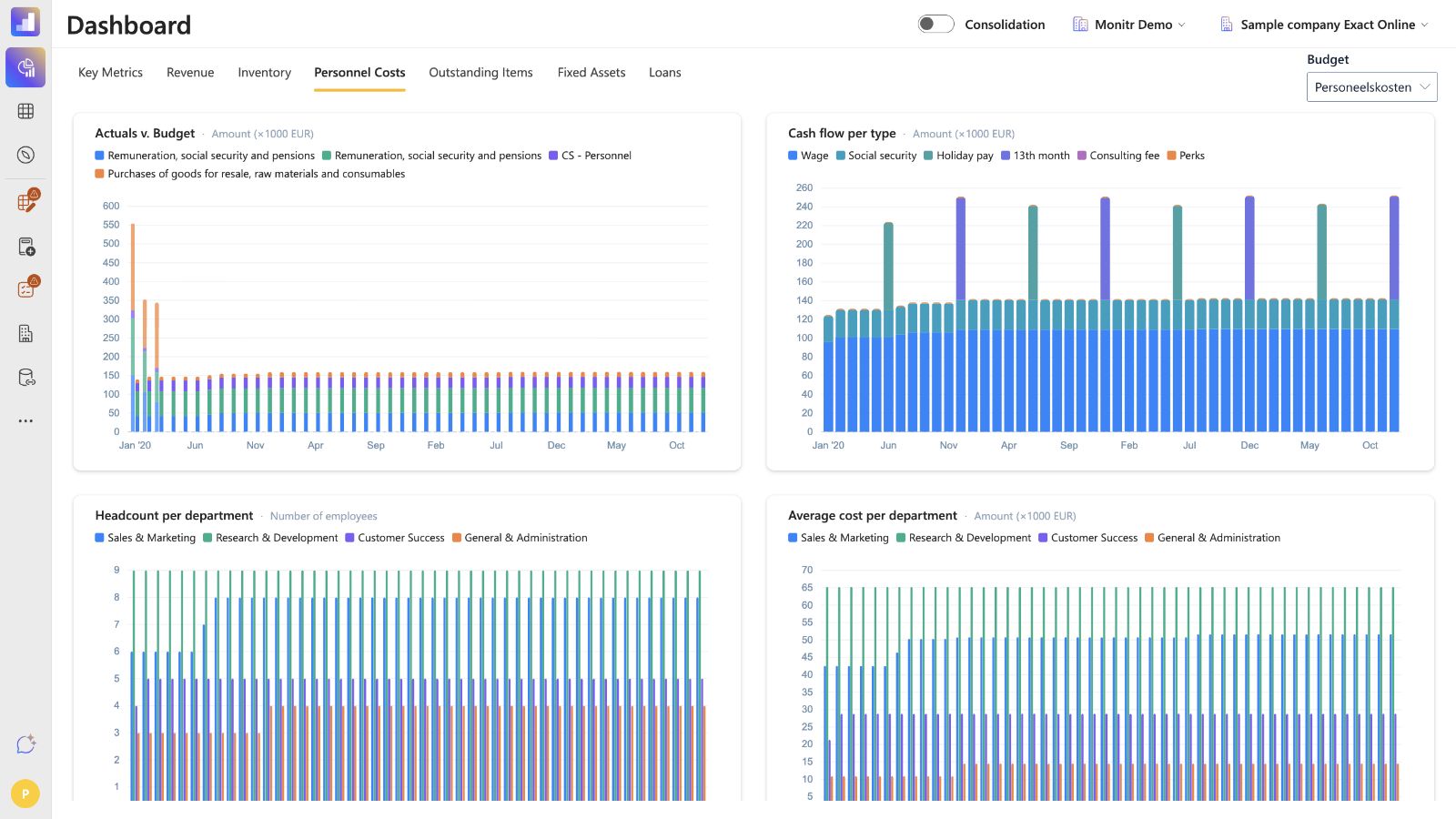
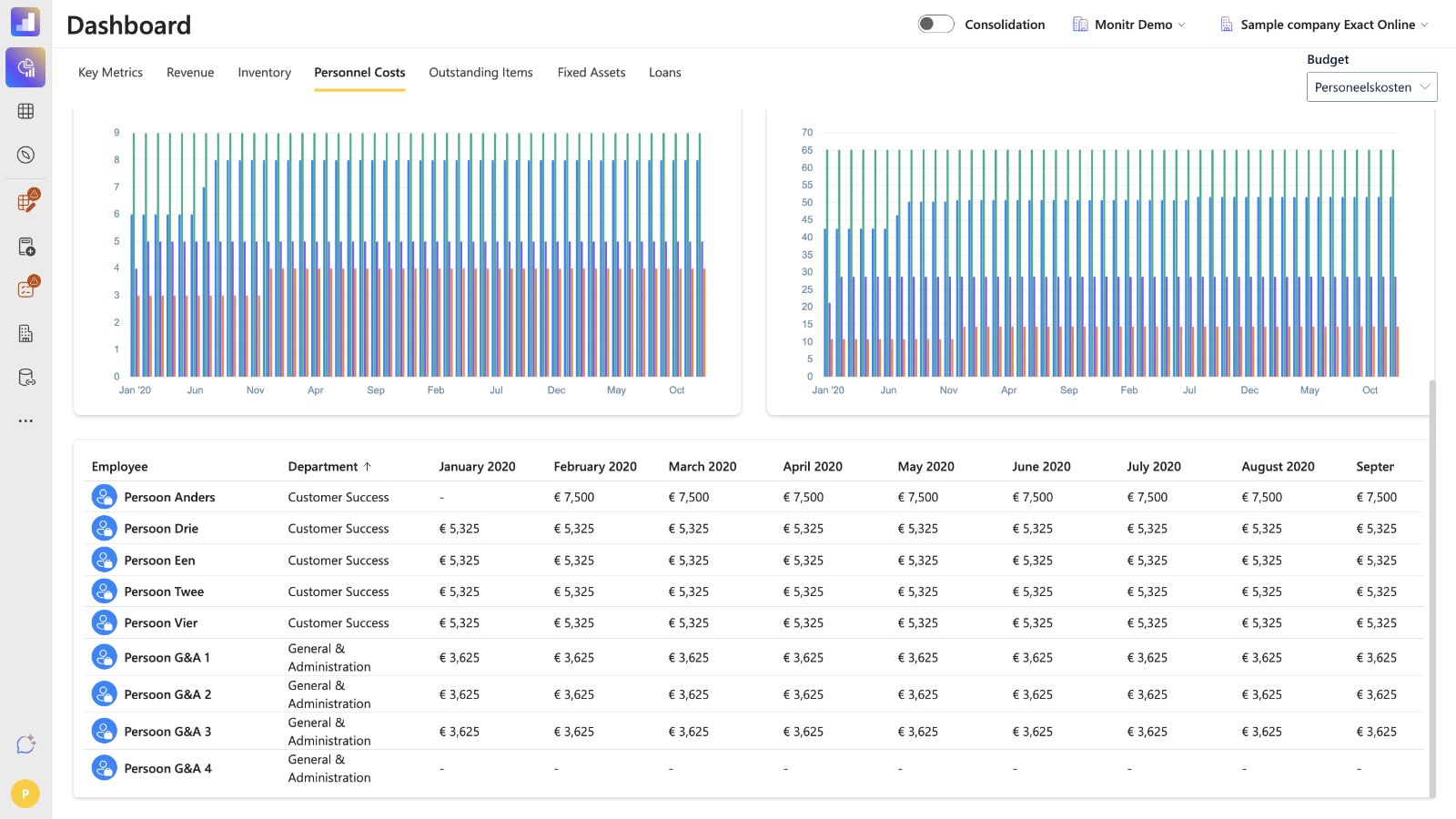
Open Dashboard → Personnel Costs and select the saved Personnel Costs budget version with the Budget filter. The dashboard contains five panels:
| Panel | What it shows |
|---|---|
| Actuals v. Budget | Actual and budget bars per reporting line |
| Cash flow per type | Wage, social security, holiday pay, 13th month, consulting fee and perks |
| Headcount per department | Active people per department and month |
| Average cost per department | Average monthly personnel cost per active person |
| Employees table | Sortable employee grid with department and monthly total cost |
The dashboard is the best place to compare the saved forecast with actuals and to investigate a monthly change after the wizard is complete.
Output in reports
- Profit & Loss — each person's personnel cost follows the P&L and analytical mapping configured in Step 4.
- Balance Sheet — accrued holiday pay and the 13th month use the debt mapping configured in Step 2.
- Cash Flow — wages, fees and perks follow their payment months; holiday pay follows Single month or Spread; the 13th-month payment creates the configured annual timing effect.
After saving, check all three statements. A correct P&L total does not by itself prove that cash timing and the accrued debt are correct.
Relationship with Project Revenue
Personnel Costs and Project Revenue use some of the same people, but the modules have different jobs.
Personnel Costs supplies which people are active and during which periods. Project Revenue then configures its own:
- chargeability or billability;
- daily or other revenue rate;
- capacity and project-revenue assumptions.
Do not claim that a consultant's monthly fee, daily rate or chargeability automatically flows from Personnel Costs into Project Revenue. Rate and chargeability are configured in Project Revenue.
Troubleshooting
| Symptom | What to check |
|---|---|
| Next is disabled in Configuration | Debt mapping and description are complete |
| Next is disabled in Employees | Every department has a person; names, periods and perk names are valid |
| Next is disabled in Mappings | Every person has a P&L mapping and non-empty description |
| A person produces no cost | Monthly gross wage or fee may still be zero |
| An individual exception disappeared | A bulk Apply config action may have overwritten it |
| A person starts or stops in the wrong month | Active period may have been clamped to the budget range |
| Unexpected December peak | Check 13th month and any one-time perks |
| Unexpected holiday-pay peak | Check Single month versus Spread, percentage and payout month |
| Nmbrs person was duplicated | Review the match table and integration IDs |
| Social security or holiday settings are missing after sync | These are Monitr forecast settings, not Nmbrs sync fields |
| Consultant cost is too low | Personnel Costs uses a monthly fee, not days × daily rate |
| Report line is wrong | Review the person's P&L/analytical mapping, not the perk separately |
| Cost and cash flow differ | Review holiday-pay and 13th-month accrual and the debt mapping |
Guidance for support teams and AI assistants
An assistant can guide the setup safely with this sequence:
- Confirm organisation, entity, scenario and reporting structure.
- Ask for the budget start and end month.
- Ask whether to start manually, from a previous budget or from Nmbrs.
- Collect global assumptions: 13th month, social security, holiday pay, payout method and month, Payroll raises and Freelance raises.
- Resolve the debt mapping and description from the entity's Balance Sheet structure.
- Create or import departments and people.
- For every person, confirm type, names, job title, active period, wage or monthly fee, raises and perks.
- Show the impact of any Apply config bulk action before using it; recheck individual exceptions afterwards.
- Resolve a P&L/analytical mapping and description for every person.
- Run a completeness check, explicitly flagging zero wages or fees.
- Review Result for headcount, total cost and cash-flow peaks.
- Show the exact proposed setup and obtain confirmation before Finish or any saved change.
- After saving, re-open the module and check Configuration, Employees, Mappings and Result.
- Verify P&L, Balance Sheet, Cash Flow and the Personnel Costs dashboard.
An assistant must not:
- invent account numbers, analytical axes or reporting lines;
- assume a universal holiday-pay percentage or payout month;
- treat a zero wage or fee as intentional without confirmation;
- run Apply config after individual exceptions without warning;
- claim that Nmbrs supplies Monitr-only forecast assumptions;
- claim that Project Revenue inherits rate or chargeability;
- save a change without showing the intended values and receiving confirmation.
Final review before Finish
- Scenario and budget range are correct.
- Global contract terms match the entity's payroll policy.
- Payroll and Freelance raise schedules are complete.
- Debt mapping and description are correct.
- Departments and people are complete.
- Every active period is correct.
- Every Employee has the intended wage and employee-specific settings.
- Every Consultant has the intended monthly fee.
- Perks have names, amounts, types and periods.
- No expected wage or fee remains zero.
- Individual exceptions survived the last bulk configuration action.
- Every person has the correct P&L and analytical mapping.
- Every budget-account description is clear.
- Result charts show the expected costs, cash timing, headcount and average costs.
- Expected holiday-pay and 13th-month peaks appear in the correct months.
- P&L, Balance Sheet and Cash Flow will be reviewed after saving.
Screenshots — verified current interface
Captured during a fresh comparison with the current Monitr interface on 1 September 2026. The screenshots below follow the setup sequence.
 Screenshot — Introduction and budget range
 Screenshot — Copy configuration from a previous Personnel Costs budget
 Screenshots — Configuration: contract terms, raises and debt mapping
 Screenshot — Employees
 Screenshot — Nmbrs sync
 Screenshot — Mappings
 Screenshot — Result
Interactive demos
- Personnel Costs walkthrough: https://app.storylane.io/demo/7pyuttna4suo
- Nmbrs integration walkthrough: https://app.storylane.io/demo/jqonpjclmkth