Loans
The Loans module forecasts loan drawdowns, principal repayments, interest and reservation interest. It creates a monthly financing schedule and makes the resulting cash-flow movements available in the forecast.
Use this module to:
- plan new financing;
- model one or more loan drawdowns;
- forecast principal and interest payments;
- include a grace period;
- model interest on committed but not yet drawn financing;
- compare the cash-flow effect of different loan structures;
- review outstanding principal by loan on the Loans dashboard.
The tested interface supports four loan types: Term loan, Linear loan, Straight loan and Bullet loan. The loan type controls the calculation logic, while the drawdown, repayment and grace-period settings determine the exact timing. Always review those settings instead of relying on the loan-type name alone.
Before you start
Prepare and confirm:
- the entity, forecast and scenario;
- the financing agreement's committed amount, duration, annual rate and loan type;
- every drawdown date and amount;
- the repayment start, principal and interest methods, and payment frequencies;
- grace-period dates, interest treatment and whether the grace period is included in or excluded from the duration;
- any reservation-interest rate on undrawn financing;
- the liability, principal, interest and reservation-interest mappings required by the active reporting structure.
Create or open a Loans budget
- Open Forecasts for the required entity.
- Expand the required forecast and scenario.
- Open an existing Loans budget or use Add to create one.
- Complete the four-step wizard:
| Step | Purpose |
|---|---|
| 1. Introduction | Explains what the module models. |
| 2. Loans | Adds loans and configures drawdowns, repayments and grace periods. |
| 3. Mapping | Assigns the generated financing movements to the reporting structure. |
| 4. Result | Reviews the combined cash-flow profile before finishing. |
The forecast period and scenario are selected before entering the module. They are not configured on the Introduction screen in the tested interface.
Step 1 — Introduction
The Introduction explains that the module can model term, bullet and straight loans, either as standalone financing or in relation to fixed-asset purchases. It also explains that Monitr generates repayment schedules and integrates the calculated movements into the forecast reports.
No configuration is required on this screen. Click Next.
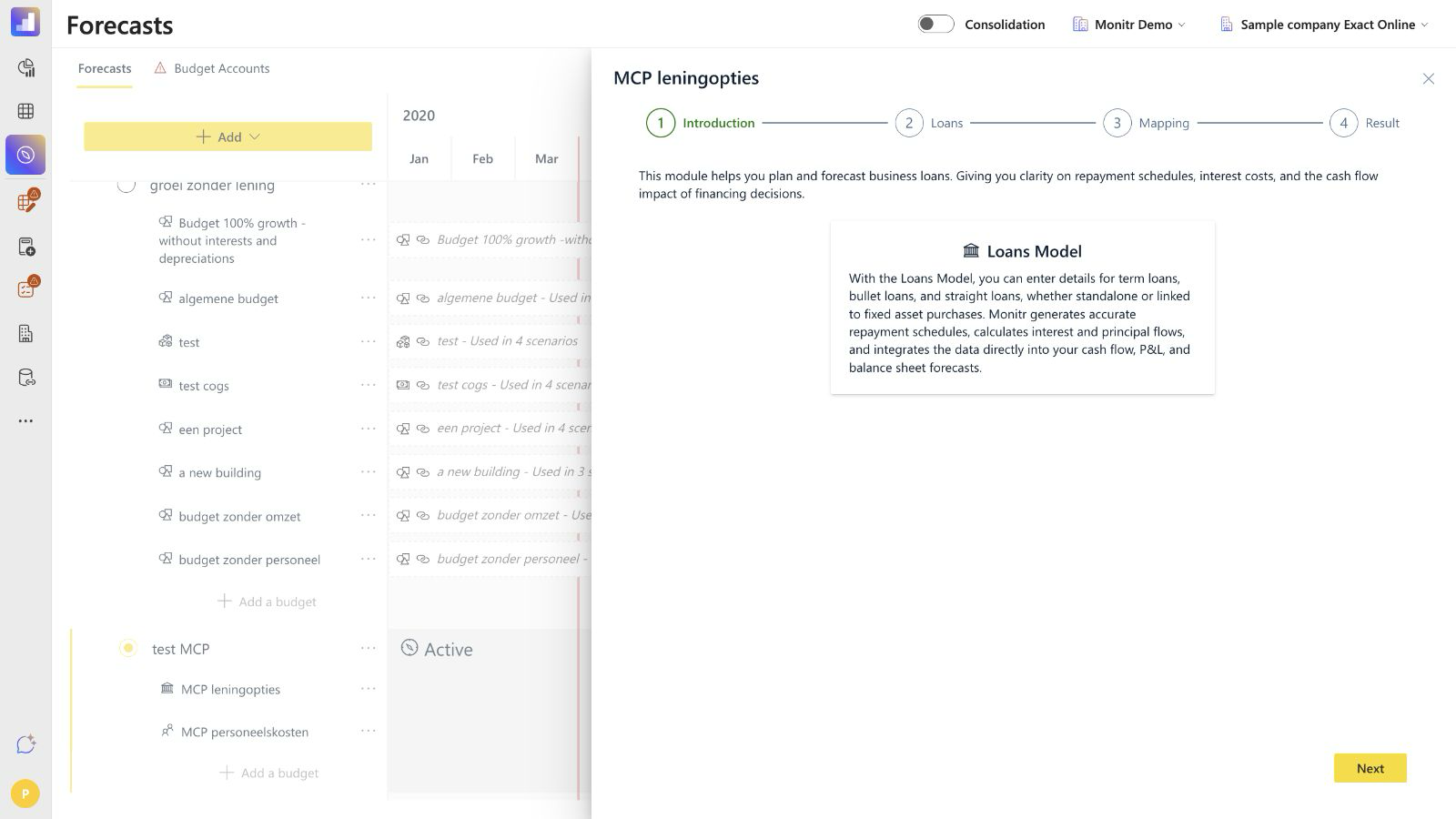 Screenshot — Loans Introduction
Step 2 — Loans
The Loans step shows one card per loan. Each card displays the name, duration, interest rate and loan type. Use Add to create another loan, the pencil icon to edit one, and the bin icon to remove one.
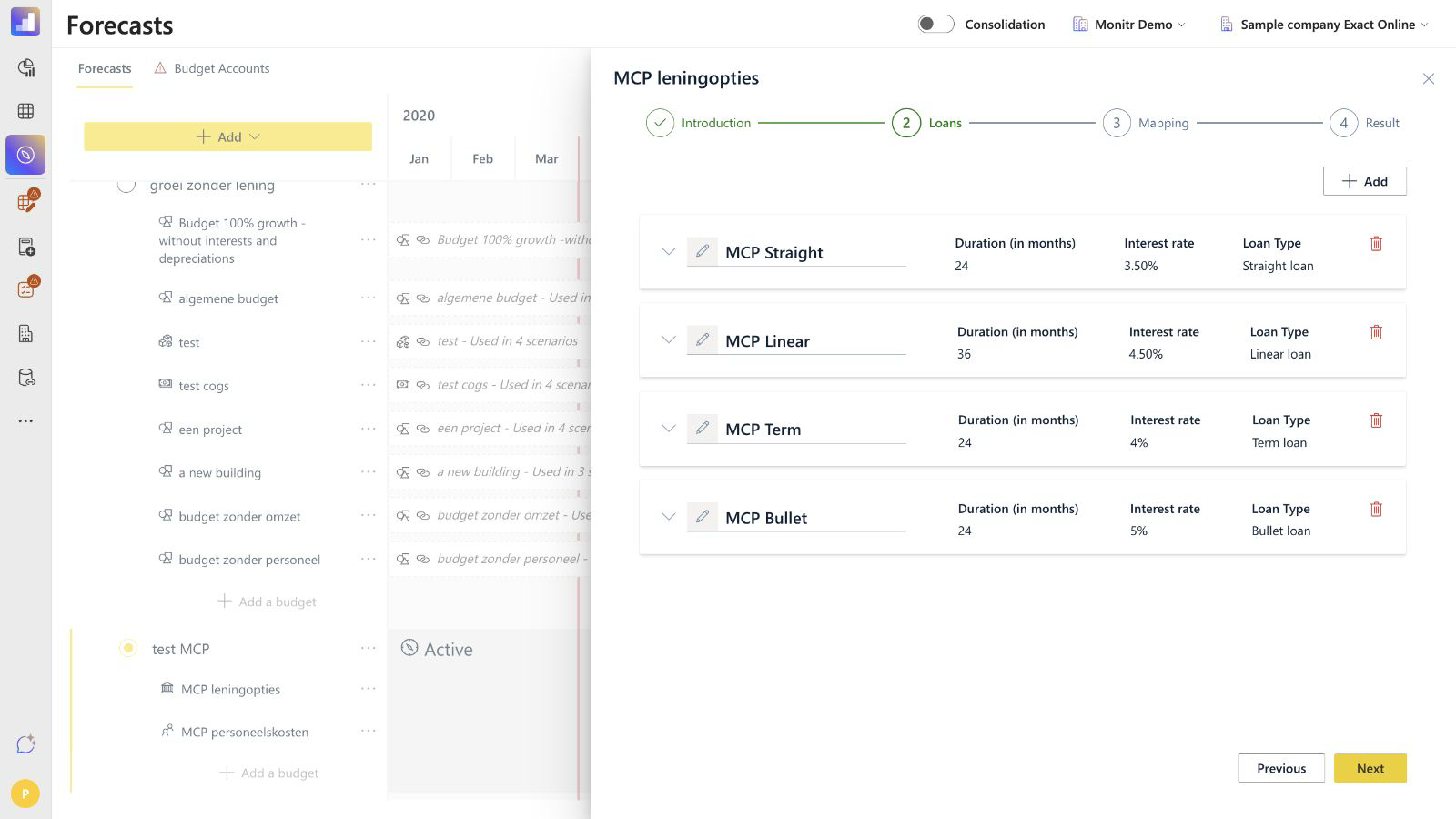 Screenshot — Loans overview with four configured loan types
General loan settings
Configure the following fields for every loan:
| Field | Meaning |
|---|---|
| Name | Identifies the loan in the wizard, dashboard charts and monthly table. Use a unique, recognisable name. |
| Duration (in months) | Number of months used for the loan schedule. The effective end date can move when a grace period is excluded from the duration. |
| Interest rate | Annual nominal rate used in the loan calculation. |
| Loan Type | Selects Term loan, Linear loan, Straight loan or Bullet loan. |
The interface does not show a separate fixed-versus-variable interest selector, opening outstanding balance field or manual loan end-date field. Enter the duration and relevant dates; Monitr derives the schedule from them.
Compare the loan types
| Loan type | Typical calculation profile | Browser-verified behaviour |
|---|---|---|
| Term loan | A level periodic total payment made up of principal and interest. | A monthly €100,000 loan at 4% over 24 months produced a payment of approximately €4,342.49. The principal portion increased while interest declined. |
| Linear loan | Equal principal instalments, with declining interest on the outstanding principal. | A €120,000 loan repaid quarterly after an included 12-month grace period produced eight principal instalments of €15,000. |
| Straight loan | Commonly uses interest during the term and principal at maturity. | The tested €80,000 setup paid €700 interest quarterly and repaid the €80,000 principal at the end. |
| Bullet loan | Commonly repays principal in one amount at maturity; interest timing depends on the selected method. | The tested €50,000 setup paid both principal and accumulated interest at the end. |
Repayment controls remain important. For example, the tested Straight and Bullet loans used a lump-sum principal method, but the exact result also depended on the selected interest method, periodicity and grace-period rules.
Configure drawdowns
Use the Drawdown section to define when financing becomes available.
Single drawdown
Leave Multiple installments? disabled and enter:
- Drawdown date;
- Amount.
The amount appears as a financing inflow in the module cash-flow schedule.
Multiple drawdowns
Enable Multiple installments? when the loan is drawn in tranches.
- Enter the date and amount for the first tranche.
- Use the plus button to add additional rows.
- Review the calculated Total.
- Enter the Reservation interest rate when the lender charges interest on the committed amount that has not yet been drawn.
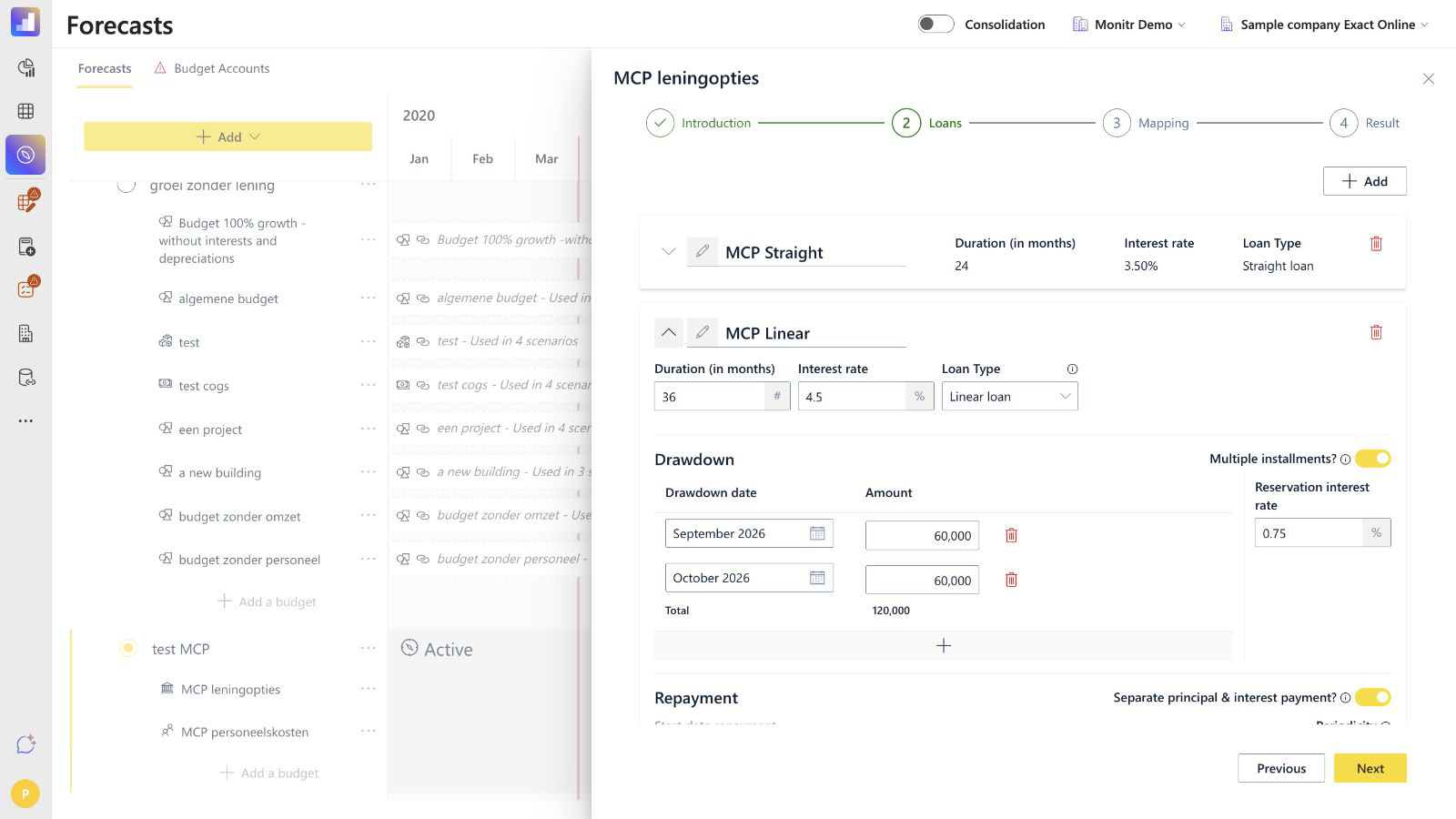 Screenshot — Linear loan with multiple drawdowns
In the browser-verified example, the loan had two drawdowns of €60,000 and a reservation interest rate of 0.75%. During the month in which only the first €60,000 was drawn, the reservation-interest charge on the undrawn €60,000 was:
€60,000 × 0.75% ÷ 12 = €37.50
Reservation interest is only shown in Mapping when the configured loan uses it.
Configure repayments
The Repayment section controls when principal and interest are paid.
Start date
Enable Start repayment when drawdown is completed. to let Monitr derive the repayment start from the final drawdown. The manual Start date repayment field is disabled while this option is active.
Disable the option only when a different repayment start date is required, then enter that date manually.
Principal and interest timing
Use Separate principal & interest payment? when principal and interest use different payment frequencies. When enabled, the interface shows separate Principal and Interest periodicity selectors. When disabled, one periodicity applies to the payment schedule.
The tested interface exposed these principal methods:
- Equal installments throughout term;
- One lump sum at end.
It exposed these interest methods:
- Periodically throughout term;
- One lump sum at end.
Select the method and periodicity that match the financing agreement. A monthly interest periodicity should not be assumed when the contract pays interest quarterly, and a bullet principal should not be modelled as equal instalments.
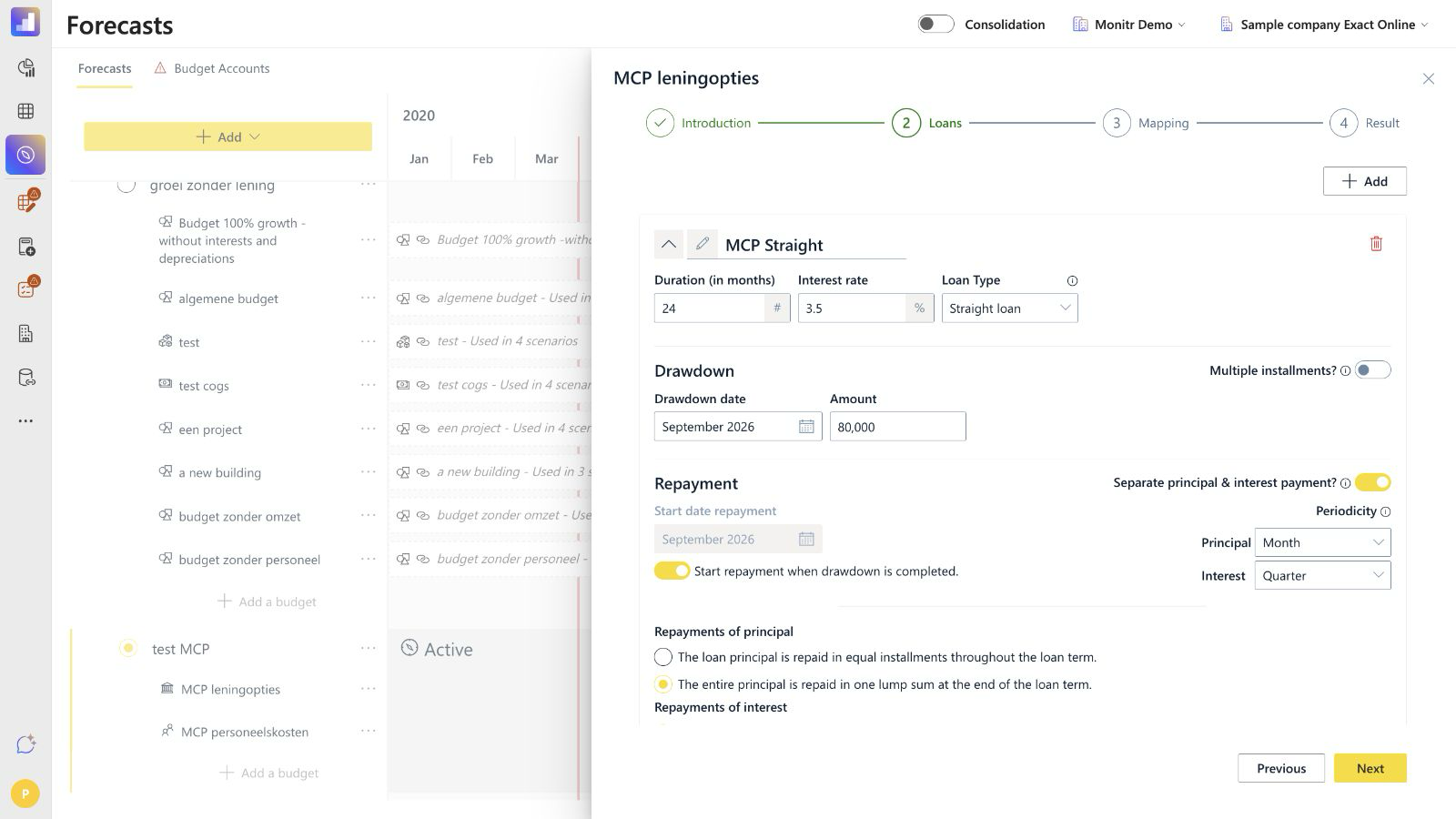 Screenshot — Straight loan repayment settings
Calculation examples
The following examples were reconciled between the visible settings and the monthly Loans dashboard:
Periodic interest
For a Straight loan of €80,000 at 3.5%, paid quarterly:
€80,000 × 3.5% ÷ 4 = €700 per quarter
Term-loan payment
For the tested monthly Term loan of €100,000 at 4% over 24 months, Monitr produced an annuity-style payment:
Payment = principal × monthly rate ÷ (1 − (1 + monthly rate)^−number of months)
This equals approximately €4,342.49 per month. The first payment consisted of €4,009.16 principal and €333.33 interest.
Linear principal
The tested Linear loan had €120,000 principal, quarterly repayments and a 12-month grace period included in its 36-month duration. This left eight repayment periods:
€120,000 ÷ 8 = €15,000 principal per quarter
Add grace periods
Use Add grace period when principal or interest follows different rules during a defined period.
For every grace period, configure:
- the start and end date;
- the Grace interest rate;
- how grace interest is paid;
- whether the grace period is included in or excluded from the loan duration.
The tested interface provided these grace-interest choices:
- monthly throughout the grace period;
- one lump sum at the end of the grace period;
- capitalised in the remaining principal.
It also provided two duration treatments:
- Grace period is included in loan duration — the original maturity is retained, leaving fewer periods for later repayment;
- Grace period is excluded from loan duration — the grace period extends the effective maturity.
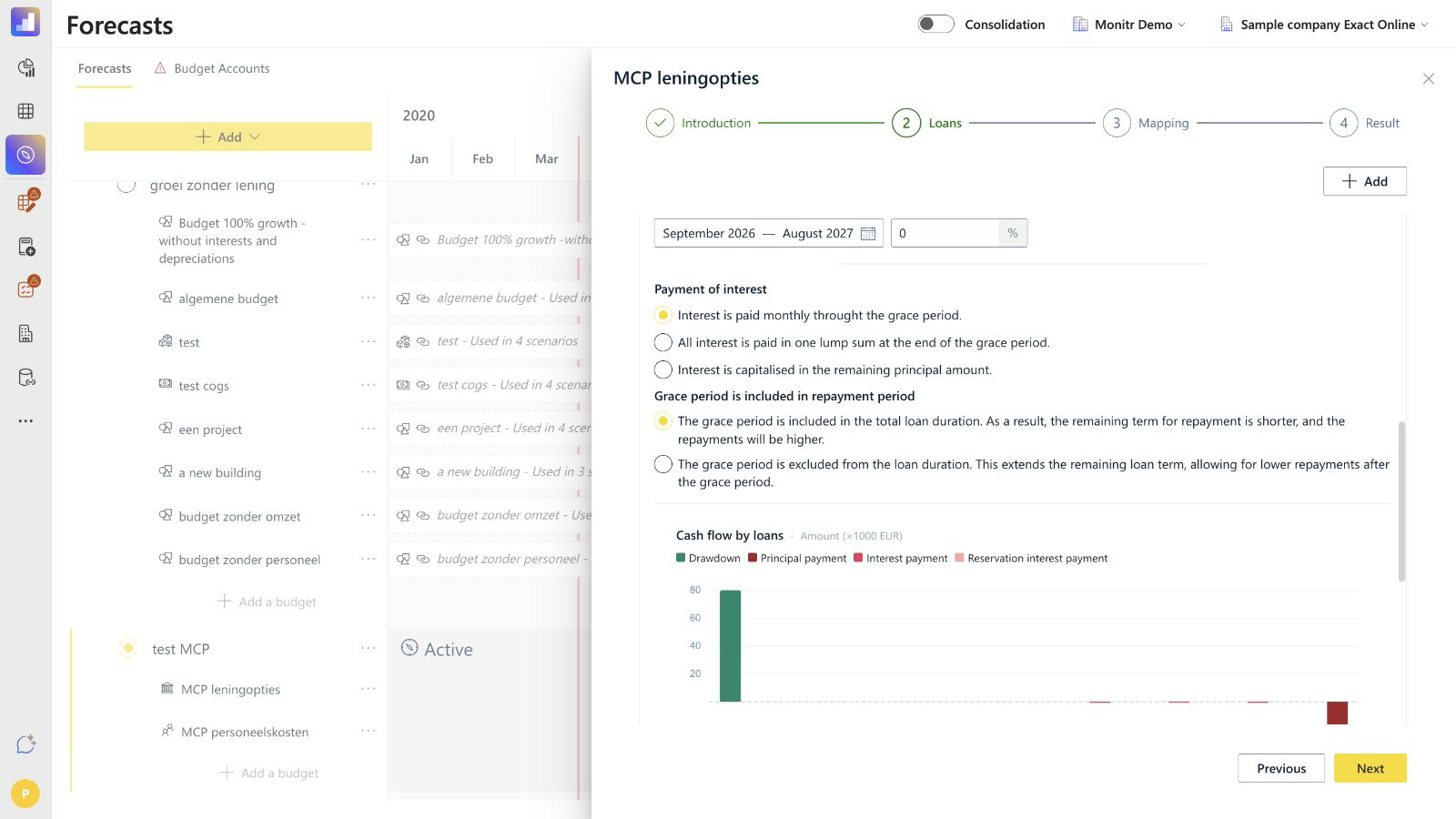 Screenshot — Straight loan grace-period settings
In the tested Bullet loan, a 12-month grace period was excluded from the 24-month duration. The drawdown occurred in September 2026 and the final principal and interest payment occurred in August 2029. With interest paid as one lump sum at the end, the €50,000 principal at 5% produced €5,247.07 interest, matching monthly compounding over 24 interest periods.
Review the per-loan Cash flow by loans chart after changing the grace-period settings. It separates:
- Drawdown;
- Principal payment;
- Interest payment;
- Reservation interest payment.
Step 3 — Mapping
Mapping determines where the generated loan movements are placed in the reporting structure.
Configure the mappings shown for each loan:
| Mapping | Purpose |
|---|---|
| Drawdown/Repayment mapping | Combined mapping used for the loan principal balance and its drawdown and repayment movements. |
| Interest mapping | Maps the loan's interest cost. |
| Reservation interest mapping | Maps reservation interest. This field appears only for loans that use reservation interest. |
Click Select a mapping, search or browse the reporting structure, choose the correct mapping and click Save.
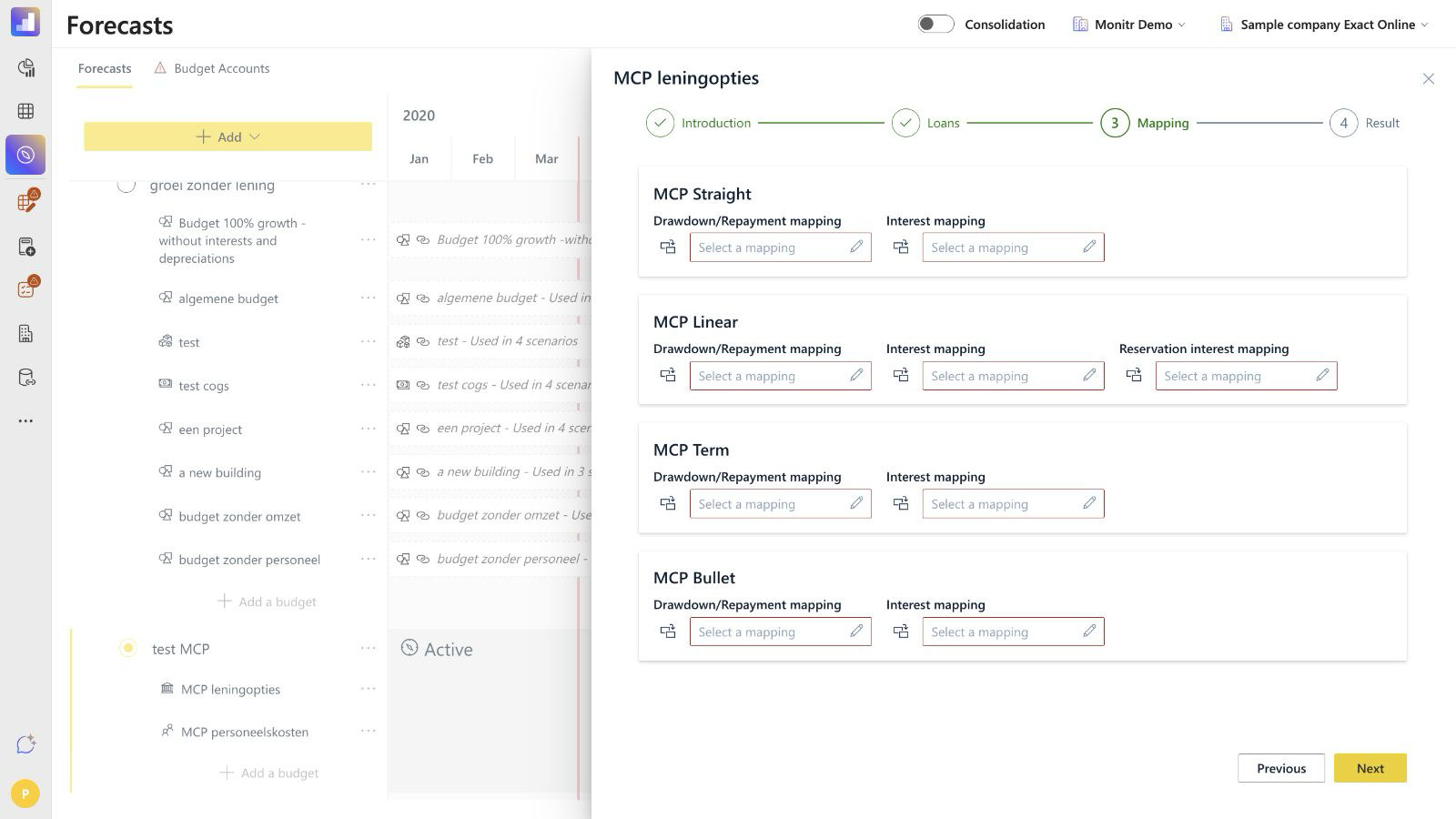 Screenshot — Loan mapping screen
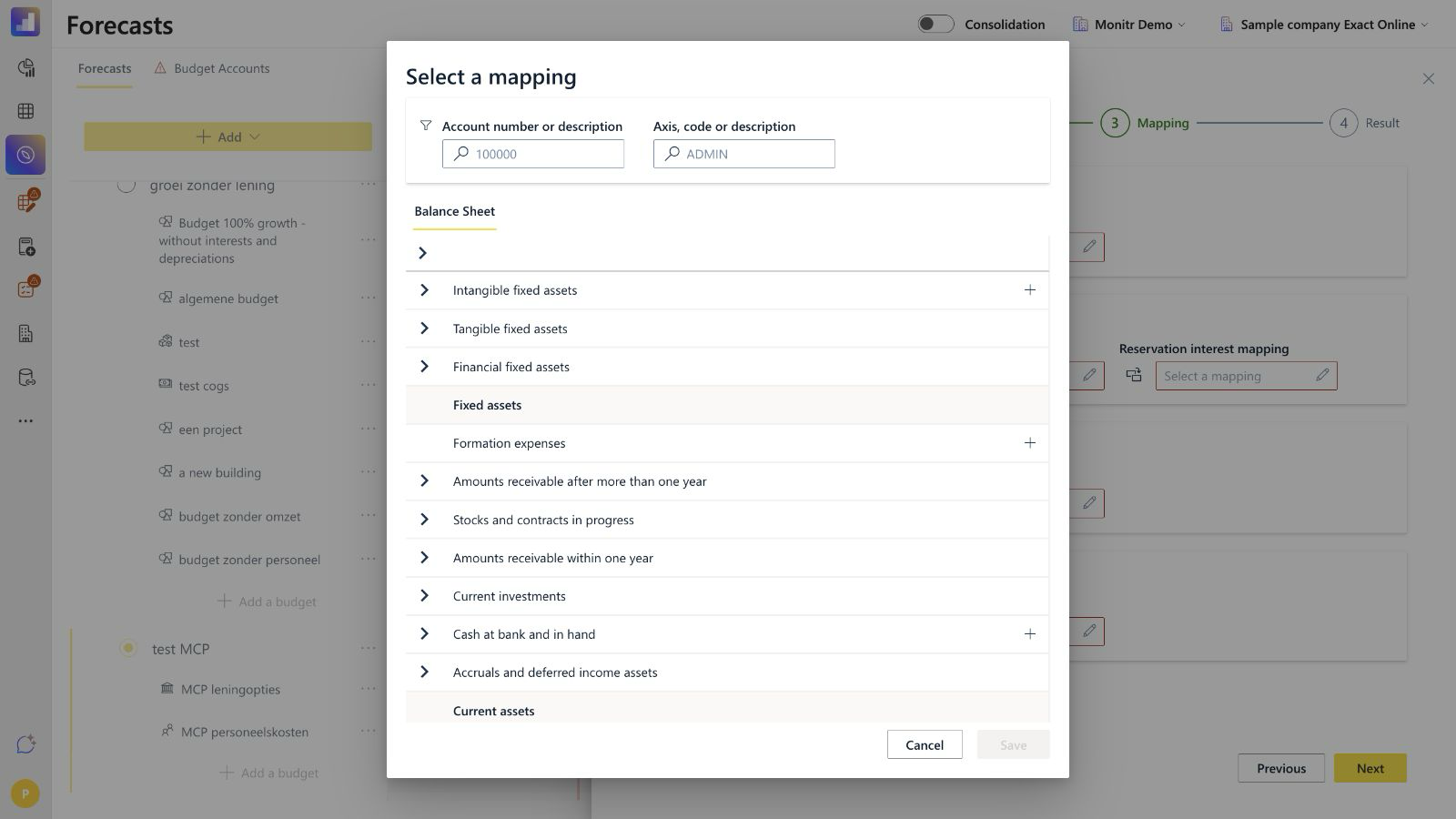 Screenshot — Mapping picker
Choose mappings that reflect the entity's reporting structure. The module does not ask for separate drawdown and repayment mappings in the tested interface; both are combined in one field. Balance Sheet classification and cash-flow presentation therefore depend on the selected mappings and reporting setup.
Before continuing, check that:
- every loan has a Drawdown/Repayment mapping;
- every loan has an Interest mapping;
- each loan with reservation interest has a Reservation interest mapping;
- the mappings belong to the correct entity and reporting structure.
Step 4 — Result
Result displays the combined Cash flow by loans chart for all loans in the budget. Use the legend to distinguish:
- Drawdown;
- Principal payment;
- Interest payment;
- Reservation interest payment.
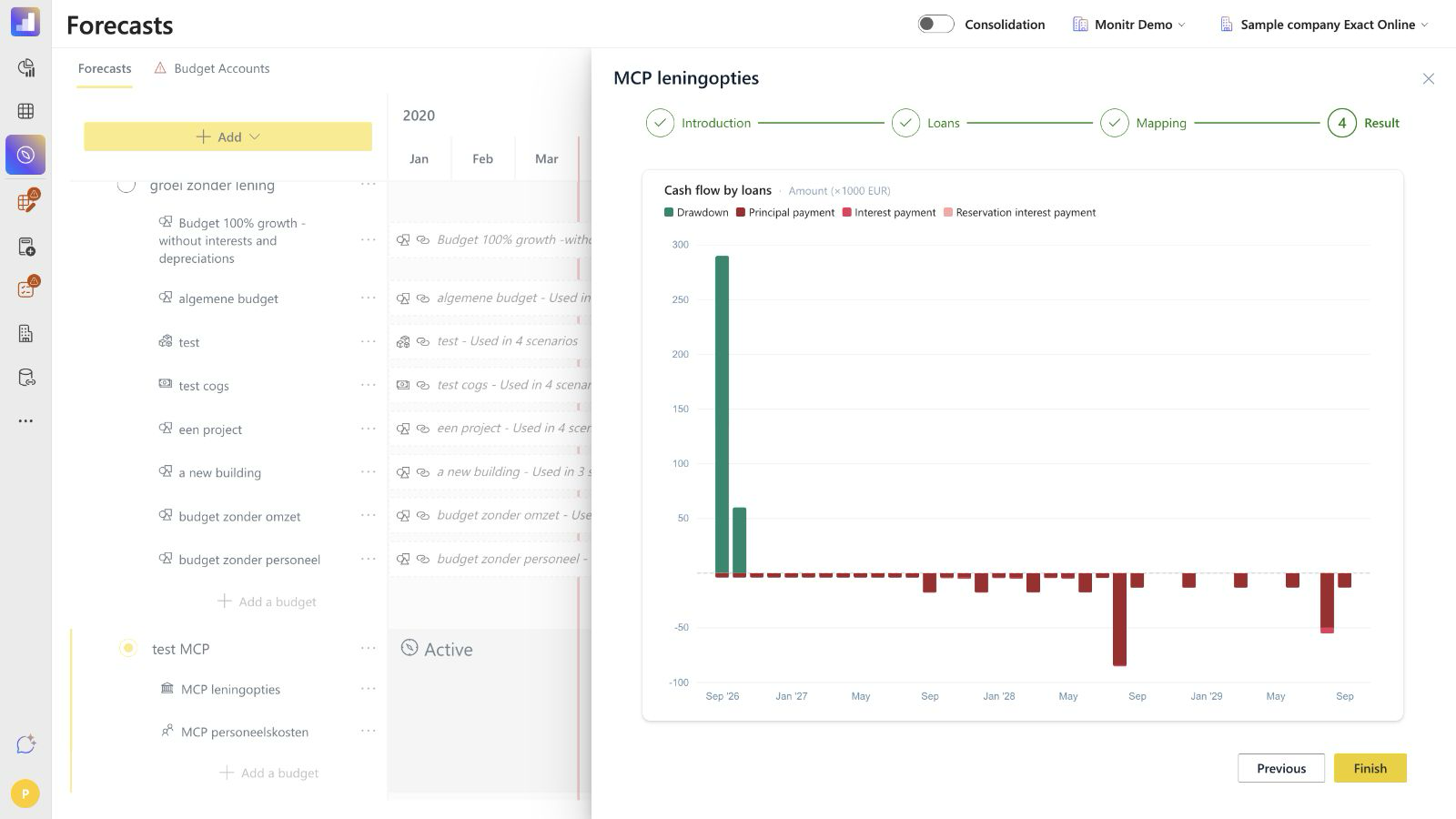 Screenshot — Loans result chart
The tested Result step contains the combined chart but no amortisation table or separate outstanding-balance table. Review detailed monthly values after finishing on the Loans dashboard.
Use Previous when the timing or amounts look incorrect. Click Finish only after reviewing the loan settings and mappings.
Review the Loans dashboard
Open Dashboard → Loans and select the required Loans budget. The dashboard contains:
- Cash flow by loans — the monthly drawdown, principal, interest and reservation-interest movements;
- Outstanding principal payments per Loan — the remaining principal profile for each loan;
- a monthly detail table.
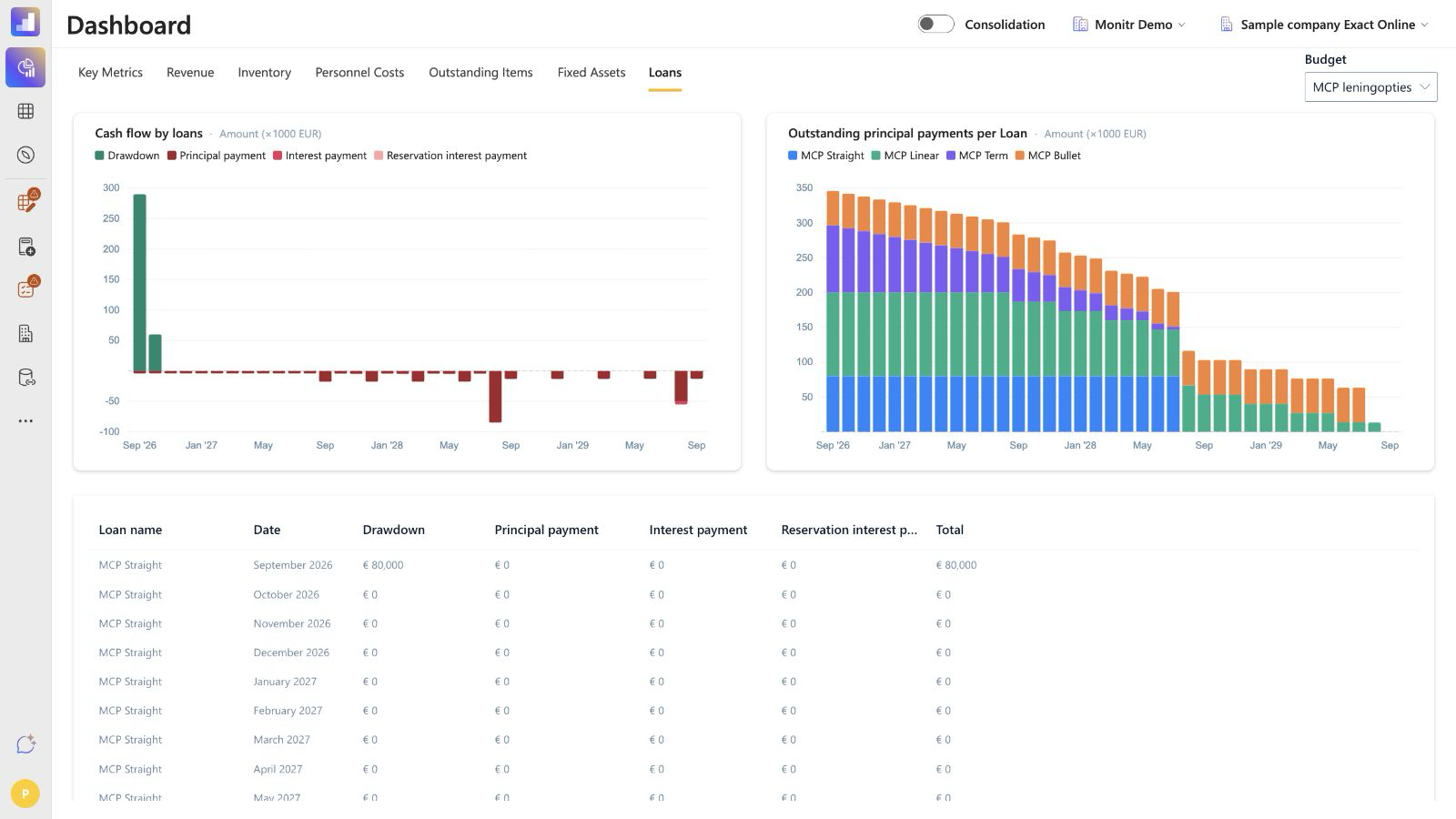 Screenshot — Loans dashboard
The monthly table contains:
| Column | Meaning |
|---|---|
| Loan name | Loan that generated the row. |
| Date | Forecast month. |
| Drawdown | Financing received in the month. |
| Principal payment | Principal repaid in the month. |
| Interest payment | Interest paid or recognised by the configured schedule. |
| Reservation interest payment | Charge on committed but undrawn financing. |
| Total | Net monthly cash-flow effect of the row. |
Use the dashboard to reconcile the contract terms month by month. Check at least the first drawdown, first repayment, recurring interest, the final principal payment and any grace-period transition.
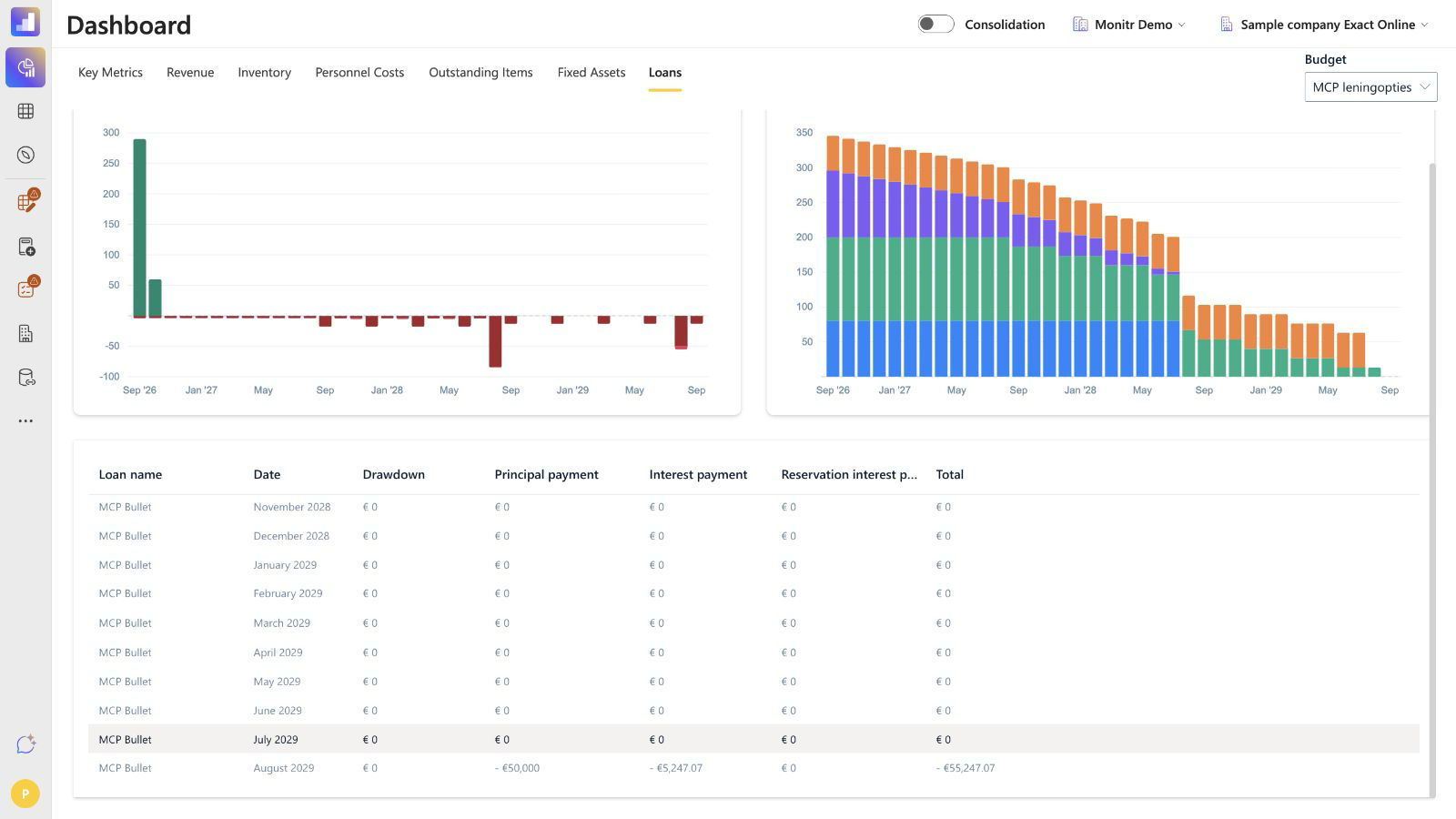 Screenshot — Bullet loan final payment on the dashboard
Report impact
The module generates financing movements from the loan schedule. Their placement in the Profit & Loss, Balance Sheet and cash-flow reports depends on the selected mappings and the entity's reporting structure.
As a control:
- map principal movements to the appropriate loan-liability mapping;
- map interest and reservation interest to the intended finance-cost mappings;
- verify the cash-flow direction of drawdowns and repayments;
- reconcile the ending outstanding principal to the dashboard;
- confirm any current/non-current liability presentation in the reporting structure rather than assuming the module splits it automatically.
Troubleshooting
The repayment starts in the wrong month
Check the final drawdown date and Start repayment when drawdown is completed. If a manual start is required, disable the switch and enter the correct date.
Principal or interest is paid at the wrong frequency
Review Separate principal & interest payment?, both periodicity selectors and the two repayment-method choices.
The loan ends earlier or later than expected
Check the duration and whether each grace period is included in or excluded from the loan duration.
Reservation interest is missing
Confirm that Multiple installments? is enabled, a later undrawn tranche exists and a non-zero Reservation interest rate is entered. Also check the Reservation interest mapping.
The Result chart looks correct but reports do not
Review all mappings. The wizard can calculate a schedule before the reporting destination has been fully validated.
An expected amortisation table is missing from Result
The tested Result step contains only the combined cash-flow chart. Use the Loans dashboard for the outstanding-principal chart and monthly detail table.
Completion checklist
Before clicking Finish, confirm that:
- the correct entity, forecast and scenario are open;
- every loan has a clear, unique name;
- duration, interest rate and loan type match the financing agreement;
- all drawdown dates and amounts are complete;
- multiple drawdowns total the committed amount;
- reservation interest is configured where applicable;
- repayment start, frequency and method match the contract;
- grace-period dates, rate, interest method and duration treatment are correct;
- the per-loan and combined cash-flow charts look reasonable;
- all applicable mappings are selected;
- the final principal is fully repaid in the expected month;
- the Loans dashboard reconciles to the financing schedule after saving.
Guidance for support teams and AI assistants
- Confirm the entity, forecast, scenario and exact financing agreement.
- Collect the committed amount, drawdowns, duration, annual rate and loan type.
- Ask whether principal and interest use separate payment frequencies.
- Ask for the repayment start and the selected principal and interest methods.
- For every grace period, confirm its dates, interest treatment and whether it is included in or excluded from the loan duration.
- Ask whether undrawn financing carries reservation interest.
- Resolve every applicable liability and finance-cost mapping from the active reporting structure.
- Show the proposed schedule and maturity effect before any saved change.
- After saving, reconcile cash flow, reports and the Loans dashboard.
The assistant must not
- infer a payment frequency that the agreement does not state;
- assume a bullet principal can be modelled as equal instalments;
- answer a maturity question without confirming how grace periods affect duration;
- invent rates, dates, drawdowns, repayment methods or mappings;
- treat the Result chart as an amortisation table;
- save a change without showing the intended schedule and obtaining confirmation.