VAT Cashflow
The VAT Cashflow module forecasts when VAT affects cash. It adds VAT to forecasted sales and purchases, builds the corresponding VAT position on the Balance Sheet and schedules payments to, or refunds from, the tax authority.
VAT Cashflow is a global budget. You configure it once at forecast level and Monitr applies the configuration across all scenarios. The VAT amounts still differ per scenario because they are calculated from the budget accounts and assumptions used in that scenario.
Use this module when you want the Cash Flow to show both:
- VAT generated when forecasted sales and purchases occur; and
- the later settlement of the accumulated VAT balance.
When and why to use VAT Cashflow
VAT is not revenue or a cost, but its timing can create a material working-capital requirement. Use VAT Cashflow whenever the gap between collecting or paying VAT and settling it with the tax authority matters for liquidity planning.
Typical situations include:
- Quarterly filing — a company builds a VAT position for two or three months and then faces one larger payment or refund after quarter-end.
- Rapid growth — rising sales increase the amount of VAT collected from customers, so the next settlement and required cash buffer also grow.
- Investment periods — large purchases or capital expenditure create input VAT and can lead to a temporary cash outflow followed by a later refund.
The module helps management judge:
- how much cash should be reserved for the next VAT payment;
- whether a quarter-end liquidity dip is caused by VAT timing rather than operating performance;
- whether the expected refund timing affects the investment plan; and
- how a scenario's sales, purchases and capital expenditure change near-term cash needs.
VAT Cashflow is most useful when the output is reviewed together with the Balance Sheet position and the underlying transaction dates. A single cumulative total does not show the temporary financing need.
Before you start
Prepare the following before configuring VAT:
- a reporting structure with the Balance Sheet line or lines used for VAT;
- the forecast modules and budget accounts that generate sales, purchases or Balance Sheet movements;
- the VAT treatment for each relevant budget account, including whether a genuinely non-taxable account should be marked with an explicit 0%;
- the VAT filing frequency and the expected payment and refund dates; and
- a decision on whether your reporting structure uses Unified VAT or Split VAT.
Do not configure rates only on revenue and cost totals. The Rates step lists individual budget accounts from both Profit & Loss and Balance Sheet. Review the underlying accounts that actually contain assumptions.
Understand the two transaction types
Monitr creates two related but separate transaction types.
| Transaction type | When it occurs | What it represents | Where it appears |
|---|---|---|---|
| Generated VAT | On the same date as the forecasted sale or purchase | VAT received with a sale or paid with a purchase | Cash Flow reports, graphs, transaction tables and the VAT Balance Sheet position |
| VAT settlement | On the configured payment or refund date after a VAT period | Payment of net VAT to, or refund of net VAT from, the tax authority | Cash Flow reports, graphs, transaction tables and the release of the VAT Balance Sheet position |
The timing difference is the purpose of the module. Generated VAT can temporarily increase or reduce cash during a period; the settlement reverses the accumulated VAT position later.
Terminology
VAT terminology can be confusing because cash-flow direction and accounting balance are not the same thing.
| Term | Meaning |
|---|---|
| Incoming generated VAT | VAT cash received with forecasted sales |
| Outgoing generated VAT | VAT cash paid with forecasted purchases |
| Incoming VAT settlement | A refund received from the tax authority |
| Outgoing VAT settlement | A payment made to the tax authority |
| VAT receivable / input VAT | VAT paid to suppliers that can be reclaimed; normally an asset position |
| VAT payable / output VAT | VAT received from customers that is owed to the tax authority; normally a liability position |
Always map the Monitr budget accounts to the reporting lines that match your own chart of accounts and bookkeeping software. Do not select a Profit & Loss line for a VAT Balance Sheet position.
Create the VAT Cashflow module
VAT is created from the global Add menu, not from Add a budget inside a scenario.
- Open Forecasts.
- Click Add at the bottom of the forecast structure.
- Select budget.
- In Add a new or existing budget, select Create a new budget.
- Under Global budgets, select VAT Cashflow.
- Complete the four wizard steps: Introduction, General, Rates and Periods.
- Select Finish only after all mappings, rates and periods have been reviewed.
Only one VAT Cashflow configuration can exist for the entity's forecast. When VAT already exists, the VAT Cashflow choice in the global budget selector is disabled. Open the existing VAT row on the Forecasts page to edit it.
Step 1 — Introduction: choose the VAT type
The Introduction explains Generated VAT and VAT settlements and asks how VAT is represented in the reporting structure.
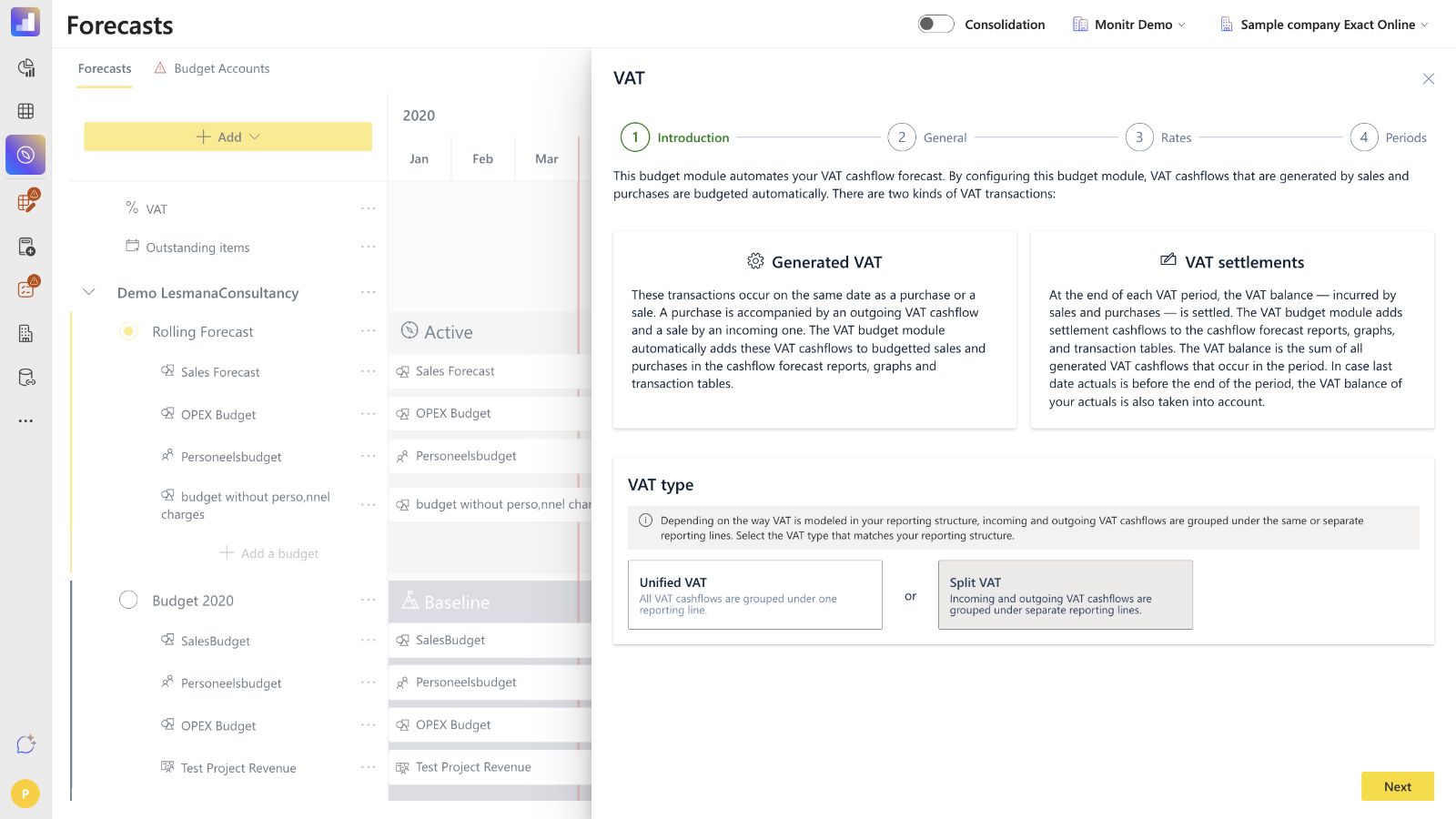 Screenshot — Step 1, Introduction
Unified VAT
Choose Unified VAT when incoming and outgoing VAT cashflows are grouped under one reporting line.
Monitr asks for two budget accounts:
- Generated VAT — contains all generated VAT transactions; and
- VAT settlements — contains all settlement transactions.
For each account, enter a name and select a Balance Sheet mapping that matches the VAT line in the bookkeeping setup.
Split VAT
Choose Split VAT when incoming and outgoing VAT cashflows are shown on separate reporting lines.
Monitr asks for four budget accounts:
- Incoming generated VAT;
- Outgoing generated VAT;
- Incoming VAT settlements; and
- Outgoing VAT settlements.
Split VAT is normally appropriate when the chart of accounts distinguishes VAT receivable/input VAT from VAT payable/output VAT. Check the economic meaning of each mapping; the words incoming and outgoing describe cash-flow direction, while receivable and payable describe the Balance Sheet position.
Changing the VAT type changes the required accounts in the next step. Review all names and mappings again after switching between Unified and Split VAT.
Step 2 — General: name and map the VAT accounts
The General step creates the budget accounts to which forecasted VAT cashflows will be assigned after the wizard is completed.
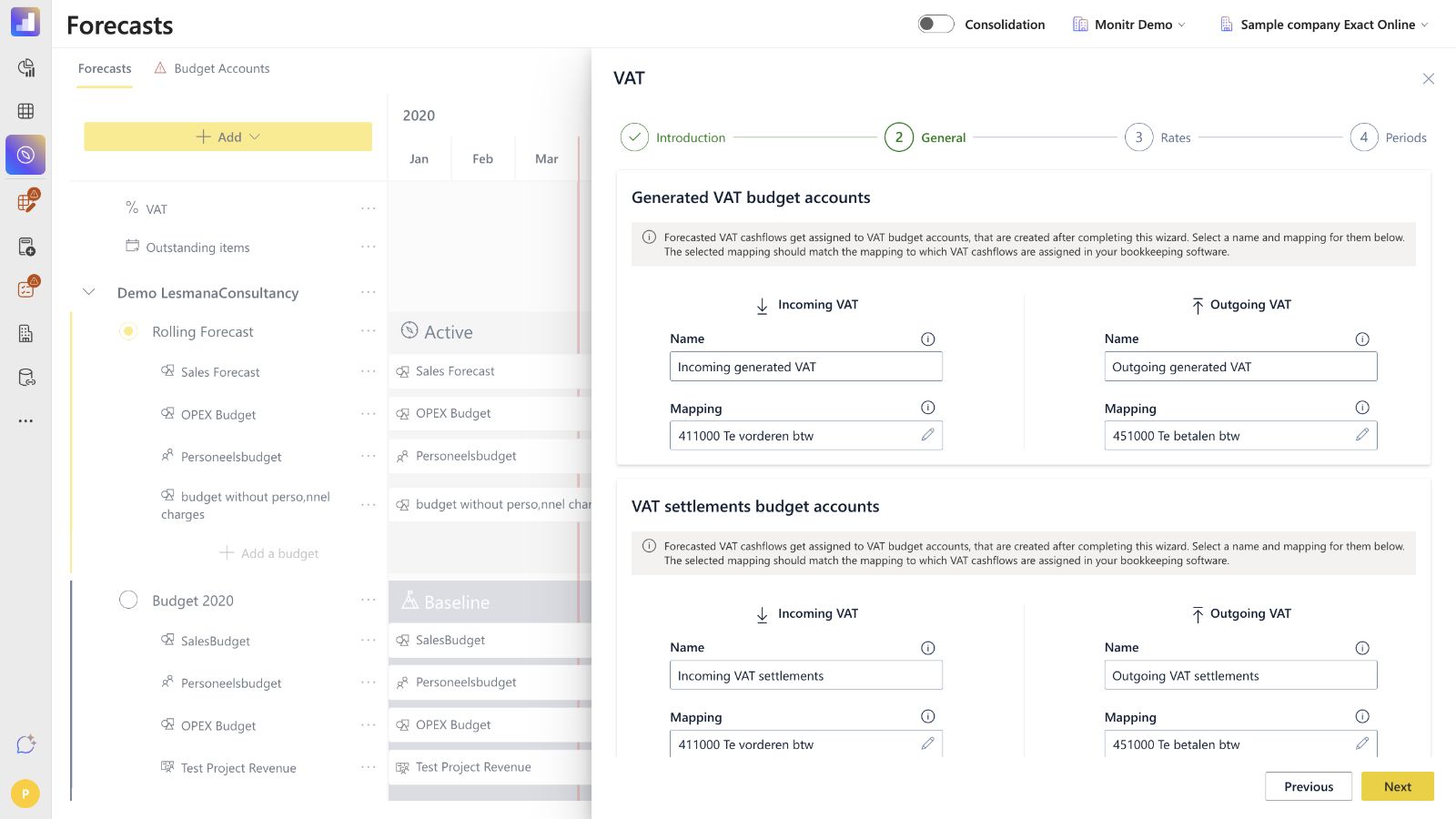 Screenshot — Step 2, General
For every displayed account:
- Enter a clear Name. Keep Generated VAT and settlements distinguishable in transaction tables.
- Under Mapping, select the corresponding VAT Balance Sheet line.
- Confirm that the mapping matches the line used for VAT in the bookkeeping software.
- In Split VAT, repeat the check separately for incoming and outgoing generated VAT and for incoming and outgoing settlements.
Recommended names are descriptive rather than generic, for example Generated VAT — sales, Generated VAT — purchases, VAT settlement — refund and VAT settlement — payment. The exact names can follow the entity's internal terminology.
If a previously selected reporting line is removed or the reporting structure changes, reopen the VAT module and repair the affected mapping. Do not assume that an old mapping still points to the intended line.
Step 3 — Rates: assign VAT percentages
Generated VAT is calculated as a percentage of budgeted sales, purchases and relevant Balance Sheet movements. Configure the percentages inside the VAT wizard:
Forecasts → VAT → Rates
The Rates step has two tabs:
- Profit & Loss; and
- Balance Sheet.
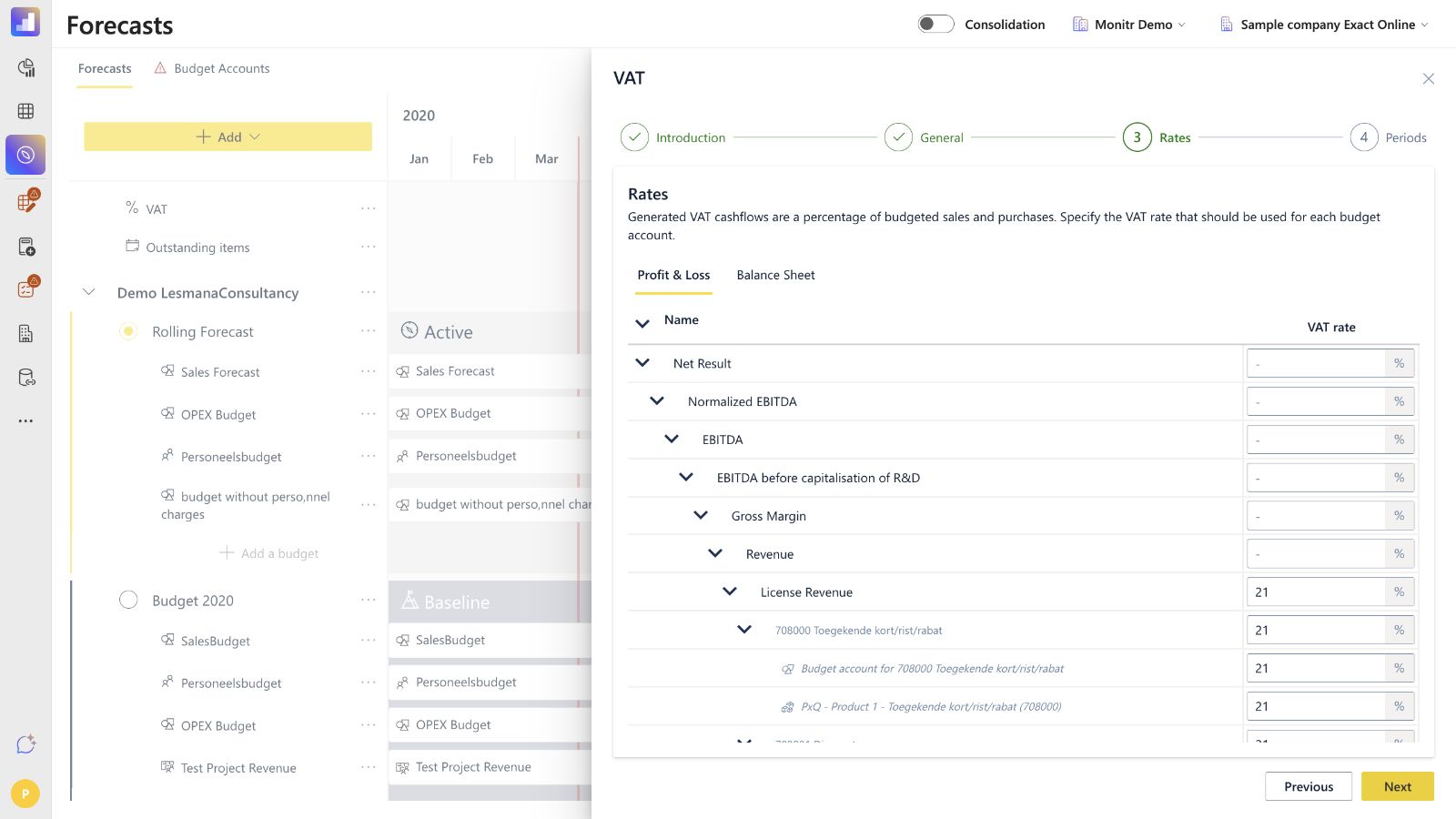 Screenshot — Step 3, Rates
Each tab follows the reporting hierarchy and lists the budget accounts beneath the reporting lines. Enter the percentage on the budget account that contains the assumption. In the percentage field, enter 21 for 21%, 9 for 9% and 0 for 0%.
Rate checklist
- Set the statutory rate that applies to the forecasted sale or purchase.
- Use 0% only when the budget account genuinely generates no VAT; do not enter a non-zero rate merely to clear a validation.
- Review reduced-rate, exempt and mixed-rate activities individually.
- Check accounts created by specialised modules such as PxQ, Recurring Revenue, Project Revenue, Personnel Costs, Fixed Assets, Loans and Inventory.
- Review the Balance Sheet tab as well as Profit & Loss.
- When one budget account contains transactions with different VAT rates, split the assumptions into separate budget accounts before relying on the VAT forecast.
Leaving a rate blank triggers the Budget accounts missing VAT validation. The validation can include non-taxable and module-generated accounts, so its presence does not mean every listed account should receive a non-zero rate. Determine whether each account needs its actual rate or an explicit 0%. If a module-generated account cannot be edited or an intentional 0% does not resolve the item, treat it as a support or product follow-up rather than inventing a rate.
Whenever a new budget account is added to any scenario module, return to VAT → Rates and assign its VAT percentage. Because VAT is global, the rate configuration is reused across scenarios, while the calculated amounts follow each scenario's budget values.
Step 4 — Periods: configure filings and settlement dates
The Periods step determines which Generated VAT transactions are accumulated together and when the net balance is paid or refunded.
For an explicitly configured year, Monitr shows:
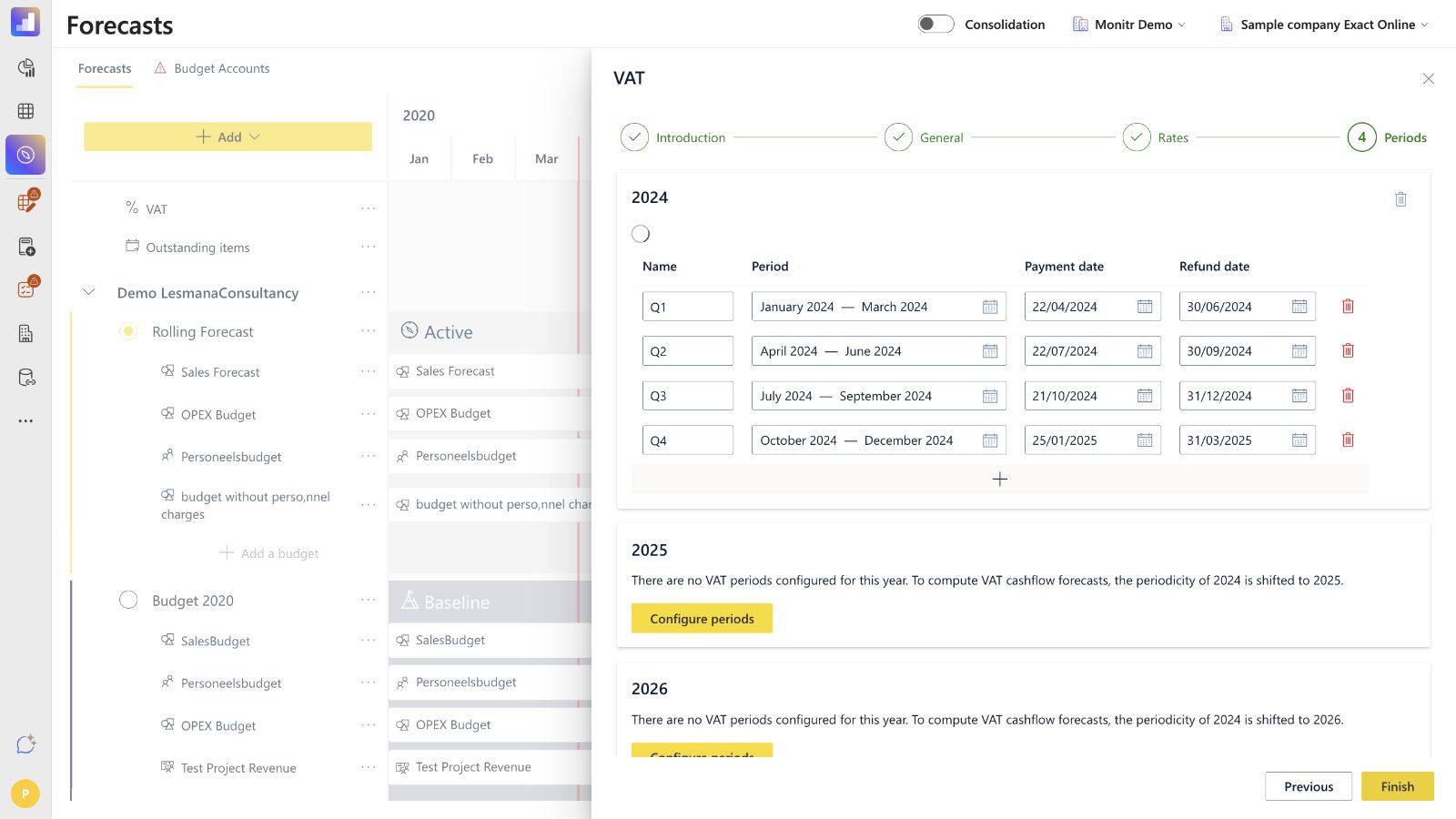 Screenshot — Step 4, Periods
| Field | What it controls |
|---|---|
| Template | Reuses a VAT period configuration as the basis for the selected year; it is not a comparison year |
| Name | A recognisable label such as January 2026 or Q1 2026 |
| Period | The first and last date included in the VAT period |
| Payment date | The date on which VAT due is paid to the tax authority |
| Refund date | The date on which a VAT refund is expected |
Configure a year
- Open the required year.
- Select a Template if you want to reuse an existing periodicity, or configure the periods manually.
- Add one row for every filing period.
- Enter the period name, start date, end date, payment date and refund date.
- Check that the periods cover the whole calendar year without gaps or overlap.
- Review payment and refund dates against the entity's actual filing practice rather than assuming that they equal the period end date.
For monthly filing, configure 12 periods; for quarterly filing, configure 4. The settlement cashflow is driven by the payment date or refund date, not by the final day of the VAT period.
Monitr does not require every forecast year to be configured manually. When a year has no explicit periods, the interface states which configured year's periodicity is shifted to that year. Review the shifted dates and configure the year explicitly if deadlines, filing frequency or business circumstances differ.
The wizard blocks Finish when periods overlap or do not span the whole year. Correct the dates before attempting to complete the configuration.
How the calculation works
For every VAT period, Monitr:
- determines the VAT balance at Last Date Actuals; in Split VAT this combines the receivable/input VAT and payable/output VAT positions;
- calculates Generated VAT on forecasted budget-account transactions using the assigned rates;
- adds Generated VAT cashflows on the dates of the forecasted sales and purchases;
- accumulates the VAT balance for the configured period; and
- creates a settlement cashflow on the configured payment or refund date.
If VAT received on sales exceeds reclaimable VAT paid on purchases, the net amount is paid on the payment date. If reclaimable VAT exceeds VAT due on sales, the net amount is received on the refund date.
Example
Assume a quarterly period contains:
- forecasted sales of EUR 10,000 excluding 21% VAT; and
- forecasted purchases of EUR 4,000 excluding 21% VAT.
Monitr generates:
- EUR 2,100 of incoming VAT with the sales;
- EUR 840 of outgoing VAT with the purchases; and
- a net VAT balance of EUR 1,260 payable to the tax authority.
The generated transactions temporarily add EUR 1,260 to cash. Monitr then creates an outgoing settlement of EUR 1,260 on the configured payment date. Across the full cycle the net VAT effect is zero, but cash is higher between collection and settlement. That timing difference is expected and is the main reason to use the module.
If Last Date Actuals falls midway through the period, the settlement also includes the VAT balance already accumulated in actuals. Do not add the opening actual VAT balance again as a forecast assumption.
Review the result
After selecting Finish, check the forecast in three places.
Balance Sheet
- Confirm that Generated VAT builds the expected VAT receivable or payable position.
- Confirm that the settlement releases the position on the configured date.
- In Split VAT, review receivable/input VAT and payable/output VAT separately.
Cash Flow
- Confirm that VAT is added to the forecasted sale or purchase date.
- Confirm that payments use the payment date and refunds use the refund date.
- Check the sign: sales VAT and refunds are incoming; purchase VAT and payments are outgoing.
Graphs and transaction tables
- Drill into the VAT lines to distinguish Generated VAT from VAT settlements.
- Confirm the source budget account, percentage and scenario.
- Review the cut-off around Last Date Actuals so actual and forecast VAT are not double-counted.
A settlement can make the net VAT cashflow zero over time while still creating a material temporary working-capital effect. Do not treat a cumulative zero as evidence that the module failed.
Validations and troubleshooting
Budget accounts missing VAT
Open Validations → Budget accounts missing VAT. The page lists budget accounts without a rate and provides Go to forecasts.
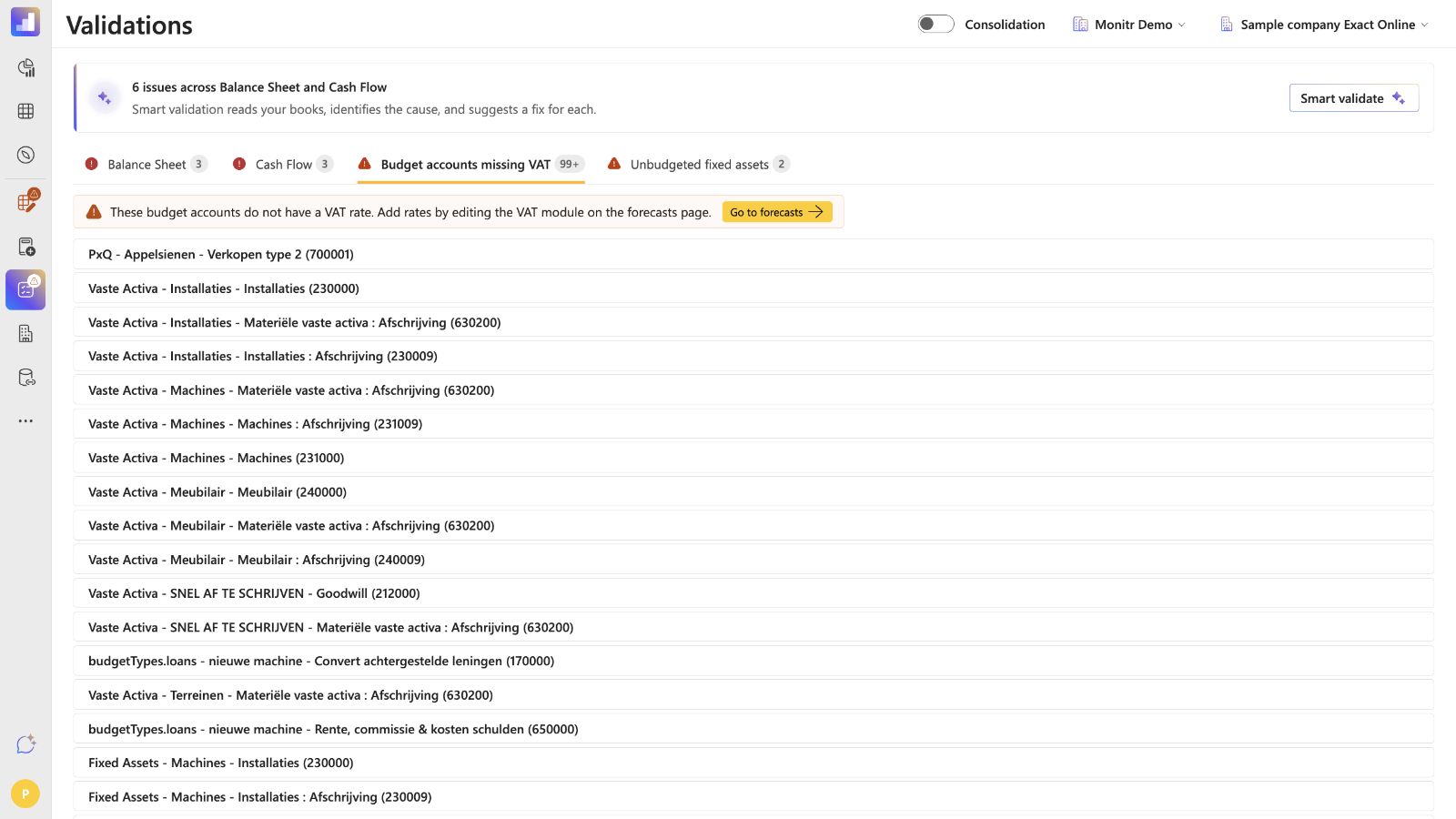 Screenshot — Budget accounts missing VAT validation
Fix the issue by opening Forecasts → VAT → Rates, not by using the separate Budget Accounts tab. Assign the correct rate. For a genuinely non-taxable account, use an explicit 0% only when that is the intended treatment; if a system-generated account remains unresolved, escalate it instead of assigning an arbitrary rate. Then review the validation again.
Finish is disabled
Check the following:
- every required VAT budget account has a name and mapping;
- the selected mappings still exist in the active reporting structure;
- the periods cover the whole year;
- no periods overlap; and
- the payment and refund dates are valid.
VAT Cashflow cannot be selected when adding a budget
VAT is a single global configuration. If the selector is disabled, return to the Forecasts overview and open the existing VAT row.
A new scenario or budget account has no VAT
The global VAT configuration applies to the scenario, but a newly created budget account still needs a rate. Open VAT → Rates, find the account under Profit & Loss or Balance Sheet and assign the percentage.
The settlement amount looks too high
Check whether Last Date Actuals falls inside the VAT period. Monitr includes the VAT balance from actuals in the settlement when the actuals cut-off is before the end of the period. Also check for duplicate forecast assumptions and incorrect non-zero rates on exempt accounts.
The settlement appears in the wrong month
Review the Payment date and Refund date in the Periods step. The period end controls which transactions are grouped; the payment or refund date controls when cash moves.
Reporting structure or mappings changed
Reopen VAT → General and reselect the intended Balance Sheet lines. Then review Rates and Periods before finishing the wizard again.
Setup checklist
Before completing the module, confirm that:
- VAT is added as a global budget, not inside one scenario;
- Unified or Split VAT matches the reporting structure;
- every Generated VAT and settlement account has a clear name and Balance Sheet mapping;
- rates are complete in both Profit & Loss and Balance Sheet;
- non-VAT accounts have an intentional treatment, with 0% used only where appropriate;
- periods cover each explicitly configured year without gaps or overlap;
- payment and refund dates reflect the expected filing calendar;
- automatically shifted years have been reviewed;
- Balance Sheet, Cash Flow and transaction-table results have been checked; and
- the Budget accounts missing VAT validation has been reviewed.
Guidance for support teams and AI assistants
To help configure VAT safely, first establish:
- the entity and active reporting structure;
- whether VAT is Unified or Split in the chart of accounts;
- the Balance Sheet mappings for generated VAT and settlements;
- the VAT rate for every relevant P&L and Balance Sheet budget account;
- the filing frequency, period boundaries, payment dates and refund dates;
- the Last Date Actuals relative to the current VAT period; and
- which forecast scenario should be used to verify the result.
An assistant should not guess rates, mappings or statutory deadlines. It should propose the configuration, ask the user to confirm accounting-specific choices, and then verify the resulting Balance Sheet and Cash Flow timing.
The assistant must not
- guess statutory VAT rates, filing frequencies, period boundaries, payment dates or refund dates;
- select a P&L line for a VAT Balance Sheet position;
- invent mappings or treat an example account as a universal default;
- assign 0% merely to clear a validation when the account's tax treatment is unknown;
- omit the opening VAT balance already included through Last Date Actuals;
- save a configuration without showing the intended values and obtaining confirmation.