Outstanding Items
The Outstanding Items module forecasts when receivables and payables affect cash flow. It combines invoices that already exist in the accounting system with invoices that will be generated by forecast budget accounts.
Use this module to answer two different questions:
- When will current open customer and supplier invoices be paid?
- How long after future forecasted revenue or costs will the related cash movement occur?
Outstanding Items is a global module. Its configuration sits at forecast level and is shared across all scenarios. Scenario selection matters in Results and on the forecasted dashboards because it determines which forecast budget accounts are included.
How the calculation works
Outstanding Items uses three timing methods. Review this summary before configuring the wizard.
| Timing method | Source | Use it when | Timing rule |
|---|---|---|---|
| Automatic payment delay | Current open receivables and payables from the accounting integration | You do not know the exact payment date for every invoice and want to use a consistent collection or payment pattern. | Monitr distributes each balance over fixed periods using percentages that add up to 100%. |
| Manual payment date | Specific current open receivables and payables | You know the expected payment date for an individual invoice. | The complete remaining amount is assigned to the month containing the selected payment date. |
| Forecasted item delay | Future P&L or Balance Sheet budget accounts | The invoice does not exist yet but the forecast should model the delay between invoice creation and payment. | The forecast amount is paid after the configured number of months. |
An existing invoice is processed either automatically or manually, never by both methods. Forecasted items are separate: they originate from budget accounts during the forecast period.
Why this matters
Profit & Loss timing and cash timing are rarely identical. Revenue can be recognised before a customer pays, and a cost can be recognised before a supplier is paid. Without Outstanding Items, a forecast can therefore show the right profit but the wrong short-term liquidity.
Typical use cases include:
- forecasting collections from current customers;
- planning supplier payments after Last Date Actuals;
- modelling customer payment terms for future sales;
- modelling supplier payment terms for forecasted operating costs or purchases;
- separating invoices with a known payment promise from invoices that should follow an average payment pattern;
- reviewing overdue exposure and its expected effect on cash.
Interaction with VAT Cashflow
Outstanding Items models the delay between an invoice or forecast account and its customer or supplier cash movement. VAT Cashflow separately models generated VAT and settlement with the tax authority. When both modules use the same forecast accounts, trace one representative transaction through P&L, Balance Sheet and Cash Flow and confirm that the payment-delay effect and VAT effect each appear exactly once. If the gross-versus-net treatment is unclear for the entity or integration, contact support before relying on the combined cash forecast.
Prerequisites
For current open receivables and payables
A Historic Outstanding Items integration must be available for the entity. It imports snapshots of open accounts receivable and accounts payable from the accounting provider.
The source documentation currently lists Exact, Moneybird, Twinfield, Yuki and Odoo. Availability can depend on the entity, provider and subscription. If the integration is not visible, confirm availability with your Monitr administrator or support contact.
Open the setup page under Integrations → Historic Outstanding Items.
Before continuing, check:
- the correct organisation and entity are selected;
- the accounting integration is up to date;
- the entity's Last Date Actuals is correct;
- a Historic Outstanding Items snapshot is available for the required reference date;
- the reporting structure contains suitable Balance Sheet mappings for receivables and payables.
For forecasted items
Forecasted items can be configured without a Historic Outstanding Items integration. The scenario must contain budget accounts that represent future revenue, costs or Balance Sheet movements.
Create or open Outstanding Items
- Open Forecasts for the required entity.
- Look for Outstanding items at forecast level, above the individual scenarios.
- If the module already exists, open it to review or change the shared configuration.
- If it does not exist, click Add, choose the budget/module creation route and select Outstanding Items under the global modules.
- Complete the six-step wizard:
| Step | Purpose |
|---|---|
| 1. Introduction | Explains the two data sources and the cash-flow timing model. |
| 2. Open Receivables | Configures current customer invoices. |
| 3. Open Payables | Configures current supplier invoices. |
| 4. Forecasted Items | Assigns item types and payment delays to future budget accounts. |
| 5. Mappings | Selects the Balance Sheet mappings and report descriptions. |
| 6. Results | Reviews the calculated cash-flow timing by scenario. |
Because the module is global, do not create a separate copy for every scenario. Configure the shared rules once and use the scenario selector when reviewing forecasted results.
Step 1 — Introduction
The Introduction explains that Outstanding Items combines:
- current open items from the accounting software; and
- budgeted sales or purchases that will generate future invoices.
No configuration is required on this screen. Click Next.
Steps 2 and 3 — Open Receivables and Open Payables
The two steps use the same structure:
- Open Receivables models collections from customers;
- Open Payables models payments to suppliers.
Configure each side separately. A company may, for example, use automatic collection rules for receivables while assigning specific manual dates to important supplier invoices.
Enable or disable the item type
Use Enable payments of outstanding receivables or Enable payments of outstanding payables to include or exclude that side from the module calculation.
Disable a side only when it is intentionally outside the forecast. If the switch is disabled, its current open items do not contribute payment timing to the calculated cash flow.
Select the reference date
The Reference date selects the snapshot of invoices that were still open at that point in time. In the tested interface, the selector contained 13 monthly dates centred around Last Date Actuals: six months before, the current month and six months after.
The displayed date is the first day after the selected month-end. For example, the snapshot after 31 March is displayed as 1 April. This is intentional and determines whether an item is classified as overdue.
Keep the two date concepts separate:
- Reference date — selects which invoices belong to the open-items snapshot.
- Last Date Actuals — determines the starting point for scheduling overdue balances into the forecast.
If the open-item count or total looks wrong, first verify the selected snapshot, the accounting import and Last Date Actuals.
Understand the four groups
Each step shows two processing methods, and each method is split by status:
| Processing method | Status | Meaning |
|---|---|---|
| Automatically included in cashflow | Not overdue | The invoice due date is after the reference date. |
| Automatically included in cashflow | Overdue | The invoice due date is on or before the reference date. |
| Manually assigned payment dates | Not overdue | A future-due invoice has been given a specific payment date. |
| Manually assigned payment dates | Overdue | An overdue invoice has been given a specific payment date. |
Use the current interface label Not overdue. Do not use the older term Pending.
The eye icon opens the underlying invoice list. Use it to reconcile the displayed count and balance, and to filter by customer or supplier where available.
Configure automatic payment delays
Click Edit payment delays. Monitr shows two fixed distribution tables: one for Not overdue and one for Overdue.
Not-overdue items
Distribute the balance over these fixed periods:
- Due date + 0 months;
- Due date + 1 month;
- Due date + 2 months.
Example: a €10,000 receivable uses 70%, 20% and 10%.
| Expected payment period | Percentage | Forecasted collection |
|---|---|---|
| Due month | 70% | €7,000 |
| One month after due date | 20% | €2,000 |
| Two months after due date | 10% | €1,000 |
| Total | 100% | €10,000 |
Overdue items
Distribute the balance over these fixed periods:
- Last Date Actuals + 1 month;
- Last Date Actuals + 2 months;
- Last Date Actuals + 3 months.
Example: a €20,000 overdue payable uses 50%, 30% and 20%.
| Expected payment period | Percentage | Forecasted payment |
|---|---|---|
| First month after Last Date Actuals | 50% | €10,000 |
| Second month after Last Date Actuals | 30% | €6,000 |
| Third month after Last Date Actuals | 20% | €4,000 |
| Total | 100% | €20,000 |
Distribution rules
- The percentages in each table must total 100%.
- Monitr shows the amount represented by every percentage.
- Configure receivables and payables independently.
- Use a realistic pattern supported by collection and payment history rather than defaulting every balance to one month without review.
- Click Save in the payment-delay dialog only after both totals equal 100%.
After saving, review the chart Cashflow from current outstanding receivables/payables. It distinguishes manual payment dates, automatic payment delays and overdue amounts. The Total line shows the combined monthly result.
Assign manual payment dates
Use manual dates when the expected payment date of a specific invoice is known, for example after a customer promise, a supplier agreement or a planned payment run.
- Click Assign manual payment dates.
- Use the Relation filter to narrow the automatic list when necessary.
- Select one or more invoices on the left.
- Use the right-arrow button to move them to Manual payment date.
- Enter a payment date for each moved invoice.
- Confirm that the payment date is after Last Date Actuals.
- Click Save.
To return an invoice to the automatic distribution, select it on the right and use the left-arrow button. Once moved back, it follows the automatic rule for its status.
Manual and automatic processing are mutually exclusive for the same invoice. The chart shows manual items separately, with an additional distinction for overdue items.
Credit notes and negative amounts
Negative amounts can appear in the current invoice tables. They commonly represent credit notes or offsets. Do not remove or reverse them merely because the sign is negative. Reconcile them with the accounting source and check how they affect the net balance and payment chart. If the resulting direction is unexpected, verify the provider data and mapping before completing the wizard.
Step 4 — Forecasted Items
Forecasted Items models future invoices that do not yet exist at the reference date. The screen contains separate Profit & Loss and Balance Sheet tabs and follows the hierarchy:
Reporting Line → Mapping → Budget Account
For every relevant row, configure:
- Outstanding item type:
- Receivable — the budget account creates a future customer invoice and expected cash inflow;
- Payable — the budget account creates a future supplier invoice and expected cash outflow;
- – — the account does not create an outstanding item.
- Payment delay — the number of months between the forecast period and the expected payment month. The minimum shown in the current interface is 1 month.
Example: a receivable budget amount in April with a delay of one month is expected to be collected in May. A payable budget amount in September with a delay of two months is expected to be paid in November.
Work from the correct level
Settings can be applied on a parent row and cascade to the children below it. This is efficient when all children genuinely use the same timing, but it can also classify accounts that should not create receivables or payables.
Recommended approach:
- Start with the reporting lines that clearly represent invoiced revenue, purchases or costs.
- Expand each line to inspect mappings and individual budget accounts.
- Apply a parent setting only when every relevant child uses the same item type and delay.
- Otherwise configure the underlying budget accounts individually.
- Review both the P&L and Balance Sheet tabs before continuing.
Do not classify non-invoice items as receivables or payables. Examples that often require separate judgment include payroll, depreciation, tax settlements, loan movements, intercompany entries and module-generated Balance Sheet movements.
Step 5 — Mappings
Select one Balance Sheet mapping for receivables and one for payables.
- Mapping for receivables should point to the Balance Sheet line that holds trade or other receivables until collection.
- Mapping for payables should point to the Balance Sheet line that holds trade or other payables until payment.
For each mapping, provide three clear descriptions:
| Type | What it represents | Suggested description pattern |
|---|---|---|
| Manual unwinding actuals | Payment of current invoices with manually assigned dates. | Manual unwinding open receivables/payables |
| Automatic unwinding actuals | Payment of current invoices distributed by the automatic rules. | Automatic unwinding open receivables/payables |
| Unwinding forecasted items | Payment of invoices generated by forecast budget accounts. | Unwinding forecasted receivables/payables |
Use descriptions that remain understandable in reports and drill-downs. The mapping determines where the outstanding balance is held on the Balance Sheet; the unwinding creates the related cash-flow timing when payment occurs.
Step 6 — Results
Use Results to validate the complete model before finishing.
- Select the required Scenario.
- Review the separate charts for receivables and payables.
- Compare the monthly totals with the configured automatic distributions, manual dates and forecasted delays.
- Select a month or chart bar to review the underlying detail when available.
The chart legend contains:
- Manual payment date;
- Manual payment date – overdue;
- Automatic payment delay;
- Automatic payment delay – overdue;
- Forecasted items;
- Total.
The result details distinguish:
- Manual — relation, invoice, amount, due date and payment date;
- Automatic — relation, due date, total amount, overdue status, delay, percentage, unwound amount and payment date;
- Forecast — budget version, budget type, budget account, amount, forecast period, delay and payment date.
Click Finish only after the scenario and both charts are plausible. Then confirm that the global Outstanding Items module remains visible at forecast level and that the intended configuration is retained.
Review the Outstanding Items dashboard
Open Dashboard → Outstanding Items. The dashboard contains four tabs, not four cards.
Current Receivables and Current Payables
The Current tabs show:
- total accounts receivable or accounts payable;
- Aging balance by days overdue;
- Balance by relation;
- an invoice detail table.
The detail table contains:
- Booking code;
- Due date;
- Relation;
- Amount;
- Amount remaining;
- Days overdue.
Click an aging bucket or relation where available to narrow the invoice detail. Use these tabs to reconcile the module's reference-date balances with the accounting source.
Forecasted Receivables and Forecasted Payables
The Forecasted tabs contain:
- a date-range slider with the reference date;
- a scenario selector;
- a monthly cash-flow chart using the same categories as Results;
- a detail area that becomes available after selecting a month.
Select the scenario and date range first, then choose a month in the chart. Review which manual, automatic and forecast-generated items make up that month.
Output in financial reports
Outstanding Items affects both the Balance Sheet and Cash Flow timing.
- Balance Sheet — receivable and payable balances remain on the mappings selected in Step 5 until the forecasted payment occurs.
- Cash Flow — customer collections and supplier payments appear in the months determined by manual dates, automatic distributions or forecasted delays.
- Forecast and drill-down views — the descriptions from Step 5 identify the generated unwinding lines.
Receivables represent expected collections; payables represent expected payments. Some charts may display payment magnitudes above zero for readability. Always confirm the final direction in the Cash Flow report rather than inferring the accounting sign from chart position alone.
End-to-end reconciliation
After completing the wizard, perform this control:
- Reconcile the Current Receivables and Current Payables totals to the selected Historic Outstanding Items snapshot.
- Verify the split between Not overdue and Overdue.
- Confirm that automatic percentages equal 100% for both statuses and both item types.
- Review every manually assigned payment date.
- Reconcile Step 4 item types to the underlying forecast budget accounts.
- Confirm the receivable and payable Balance Sheet mappings.
- Select the scenario in Results and compare the monthly chart to the expected timing.
- Review the four dashboard tabs.
- Open the Balance Sheet and Cash Flow reports and trace at least one current receivable, one current payable and one forecasted item.
What to review after new actuals are imported
When the accounting data or Last Date Actuals changes:
- confirm that the new accounting import completed successfully;
- reopen Outstanding Items;
- review the reference date and snapshot totals;
- check whether previously manual invoices were paid, changed or disappeared from the open list;
- review the Not overdue and Overdue classification;
- reassess automatic collection and payment percentages;
- review the scenario results and dashboards;
- reconcile the updated Balance Sheet and Cash Flow output.
Do not assume a previous manual list or overdue distribution remains appropriate after a new import.
Troubleshooting
| Problem | Likely cause | What to check |
|---|---|---|
| No open receivables or payables appear | Historic Outstanding Items is unavailable, not up to date or the wrong snapshot/entity is selected. | Confirm entity, integration, reference date, provider support and accounting import. |
| The total differs from accounting | Different snapshot date, partial payments, credit notes or provider data differences. | Reconcile reference date, amount remaining and negative items to the source system. |
| Payment-delay settings cannot be saved | A Not overdue or Overdue distribution does not total 100%. | Correct each table separately for receivables and payables. |
| A manual payment date is rejected | The date is not after Last Date Actuals or is otherwise outside the allowed range. | Select a valid future payment date and recheck Last Date Actuals. |
| Payment delay is disabled in Forecasted Items | No Receivable or Payable type is selected on that row, or the row inherits/does not allow direct editing. | Set the item type first and inspect the underlying budget account. |
| A forecasted amount is missing from Results | Wrong scenario, no item type, missing delay, inactive budget or date range mismatch. | Check the scenario and the exact leaf budget account in Step 4. |
| Balance Sheet output is missing or implausible | Receivable/payable mapping is absent or incorrect. | Reopen Step 5 and trace the mapping in the selected reporting structure. |
| Cash timing is duplicated | The same economic item is modelled elsewhere or a parent setting classified too many child accounts. | Review module overlap and Step 4 cascade settings. |
| A negative invoice has an unexpected effect | Credit note or source sign is not understood. | Reconcile the item to accounting and verify the net effect in Results and Cash Flow. |
Completion checklist
Before finishing, confirm:
- ☐ correct organisation and entity;
- ☐ correct Last Date Actuals;
- ☐ correct reference date for receivables and payables;
- ☐ current-item counts and totals reconciled;
- ☐ automatic percentages total 100% in every table;
- ☐ manual invoices and payment dates reviewed;
- ☐ both P&L and Balance Sheet checked in Forecasted Items;
- ☐ Receivable, Payable and no-item classifications reviewed at leaf level;
- ☐ payment delays are appropriate;
- ☐ receivable and payable Balance Sheet mappings are correct;
- ☐ descriptions are clear in reports;
- ☐ correct scenario selected in Results;
- ☐ both Results charts are plausible;
- ☐ four dashboard tabs reviewed;
- ☐ Balance Sheet and Cash Flow output reconciled.
Guidance for support teams and AI assistants
Use the following sequence when guiding a user:
- Ask which organisation and entity they are working in.
- Confirm whether the question concerns current open invoices, forecasted items or both.
- Confirm Last Date Actuals and the required reference date.
- For current items, verify that Historic Outstanding Items is available before troubleshooting the wizard.
- Ask whether the user knows exact payment dates for specific invoices:
- if yes, use Manually assigned payment dates;
- if no, configure Automatically included in cashflow.
- Require every automatic distribution to total 100%.
- For future items, identify the exact scenario and budget accounts, then choose Receivable, Payable or no item type and set the delay.
- Confirm the Balance Sheet mappings before interpreting report output.
- Review Results and the dashboards before concluding that the setup is correct.
- When evidence is incomplete, ask for the relevant screen, entity, scenario, reference date and displayed totals. Do not invent provider availability, invoice status or cash-flow results.
Always use the current interface terms Not overdue, Overdue, Automatically included in cashflow, Manually assigned payment dates and Forecasted Items.
Interface screenshots
The following screenshots were captured in the Monitr Demo environment and follow the module flow.
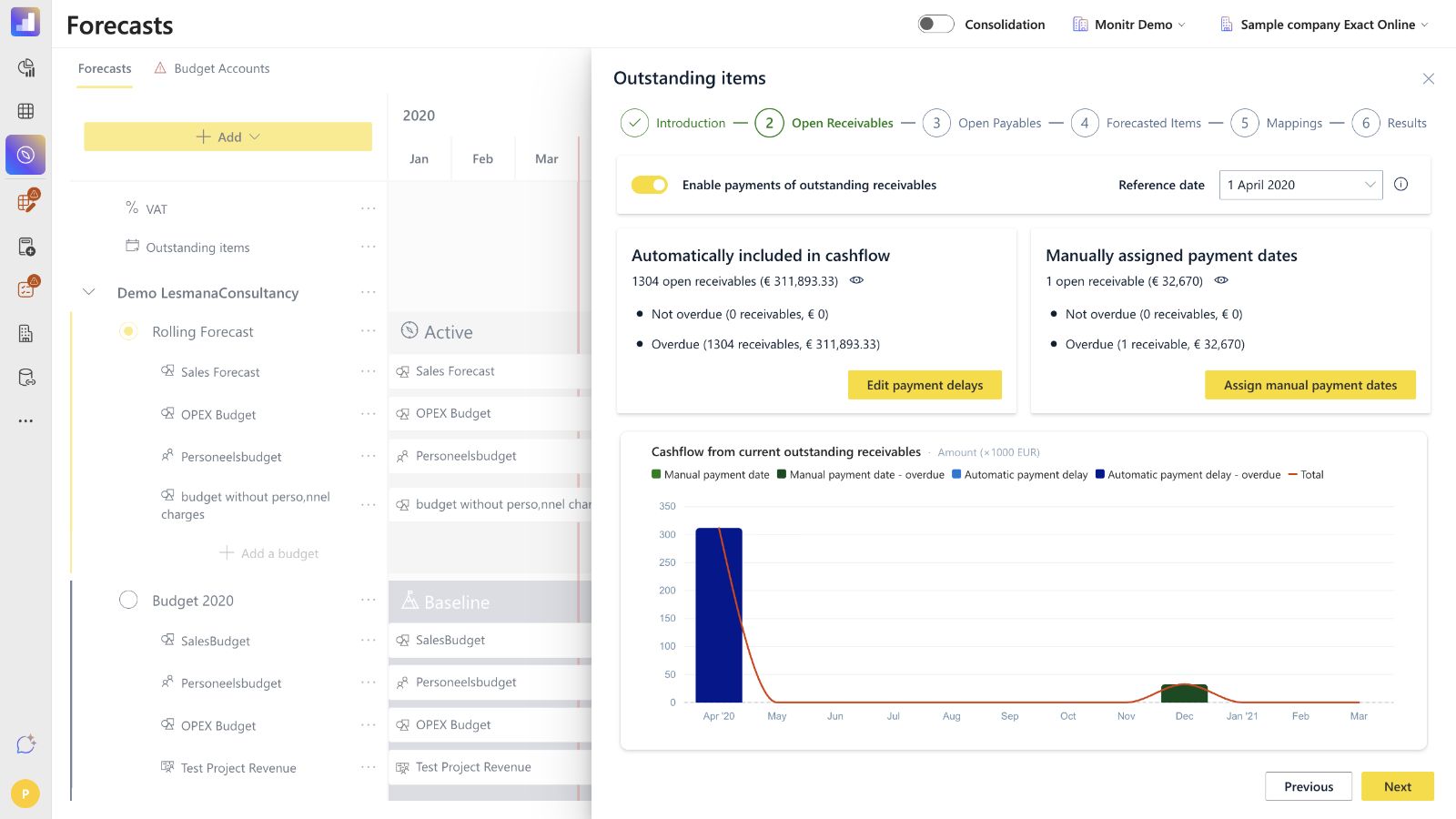 Screenshot — Open Receivables overview with automatic and manual groups
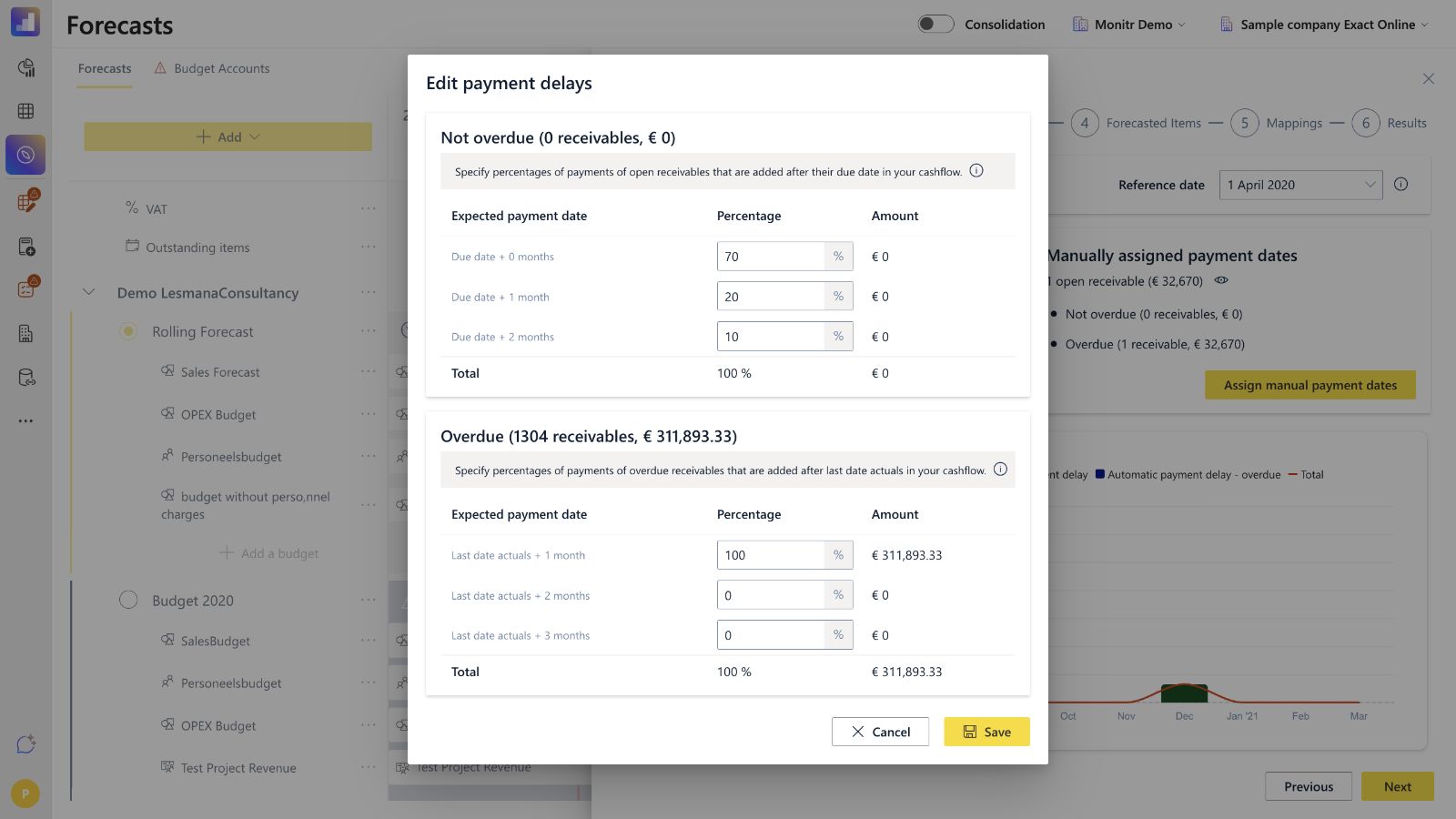 Screenshot — Automatic payment-delay tables
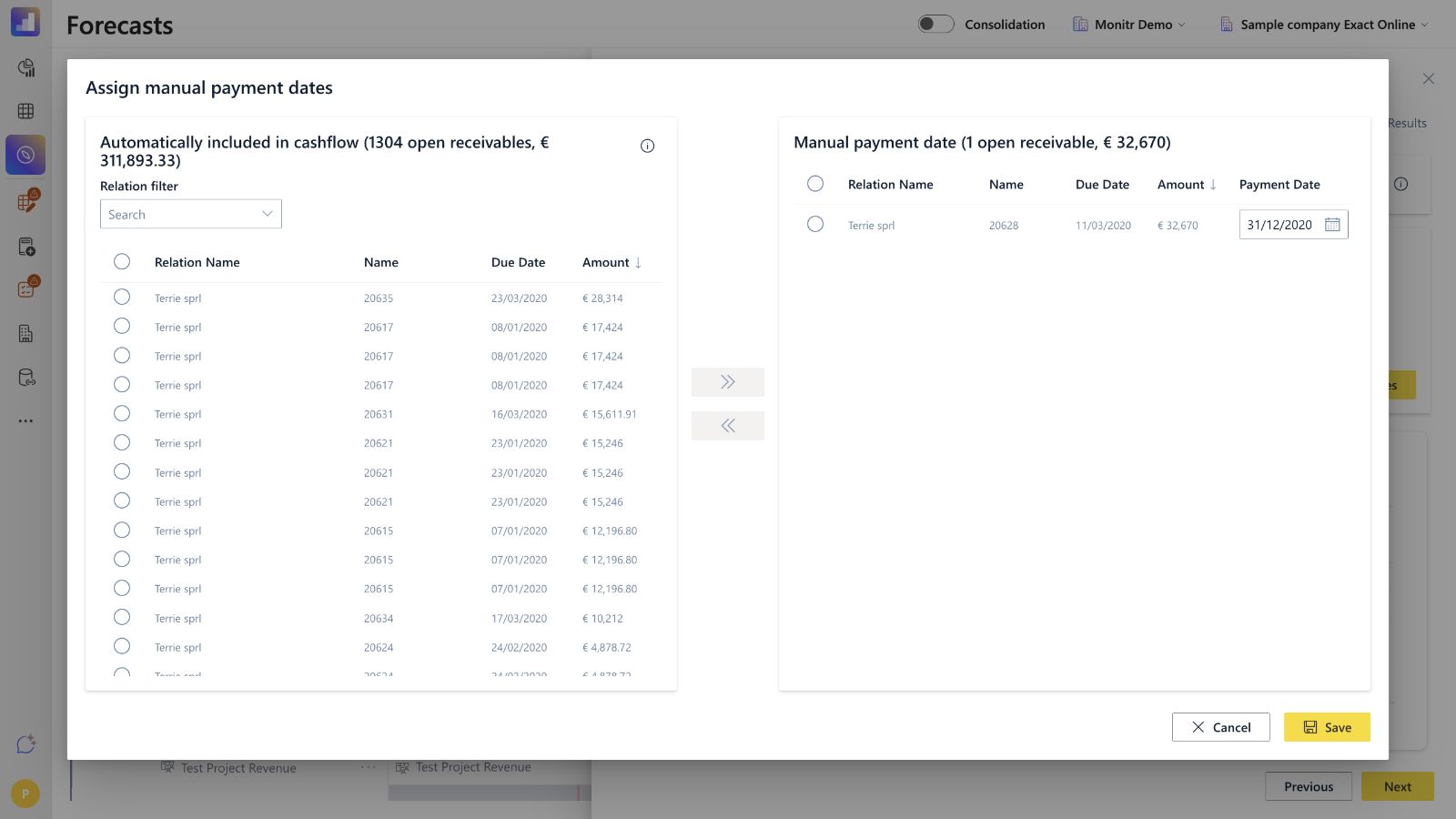 Screenshot — Assign manual payment dates
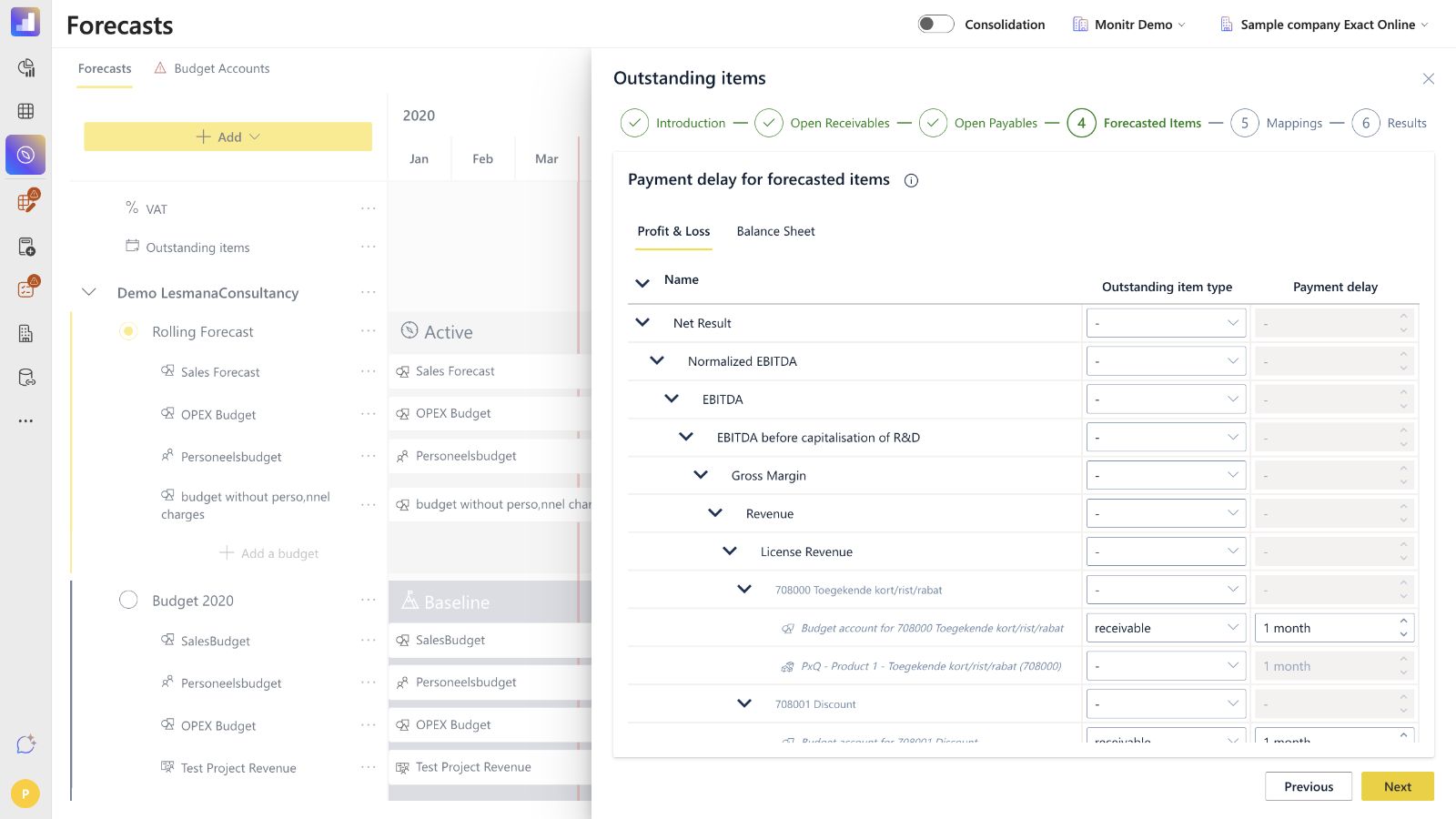 Screenshot — Forecasted Items configuration
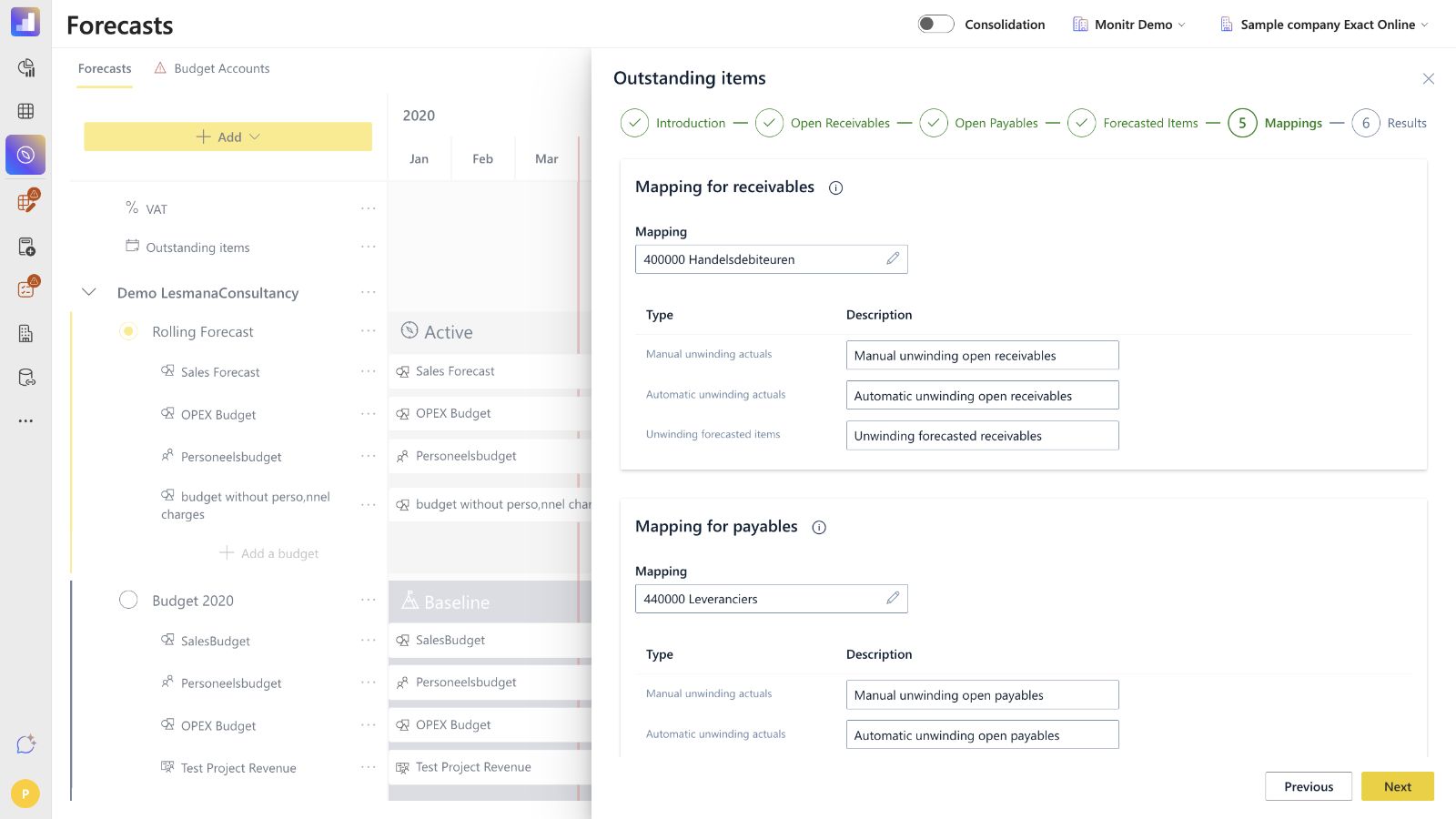 Screenshot — Receivables and payables mappings
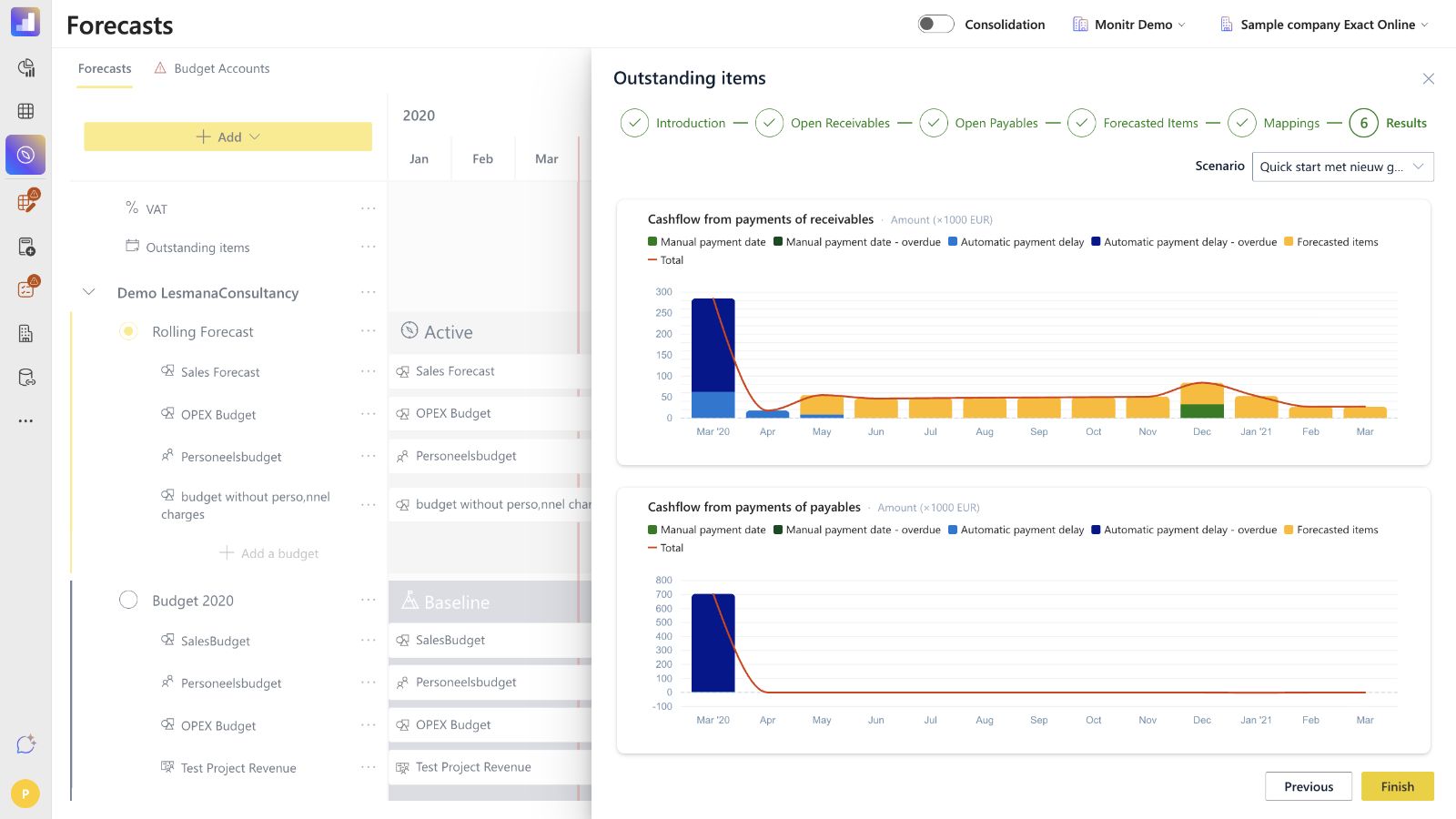 Screenshot — Outstanding Items results
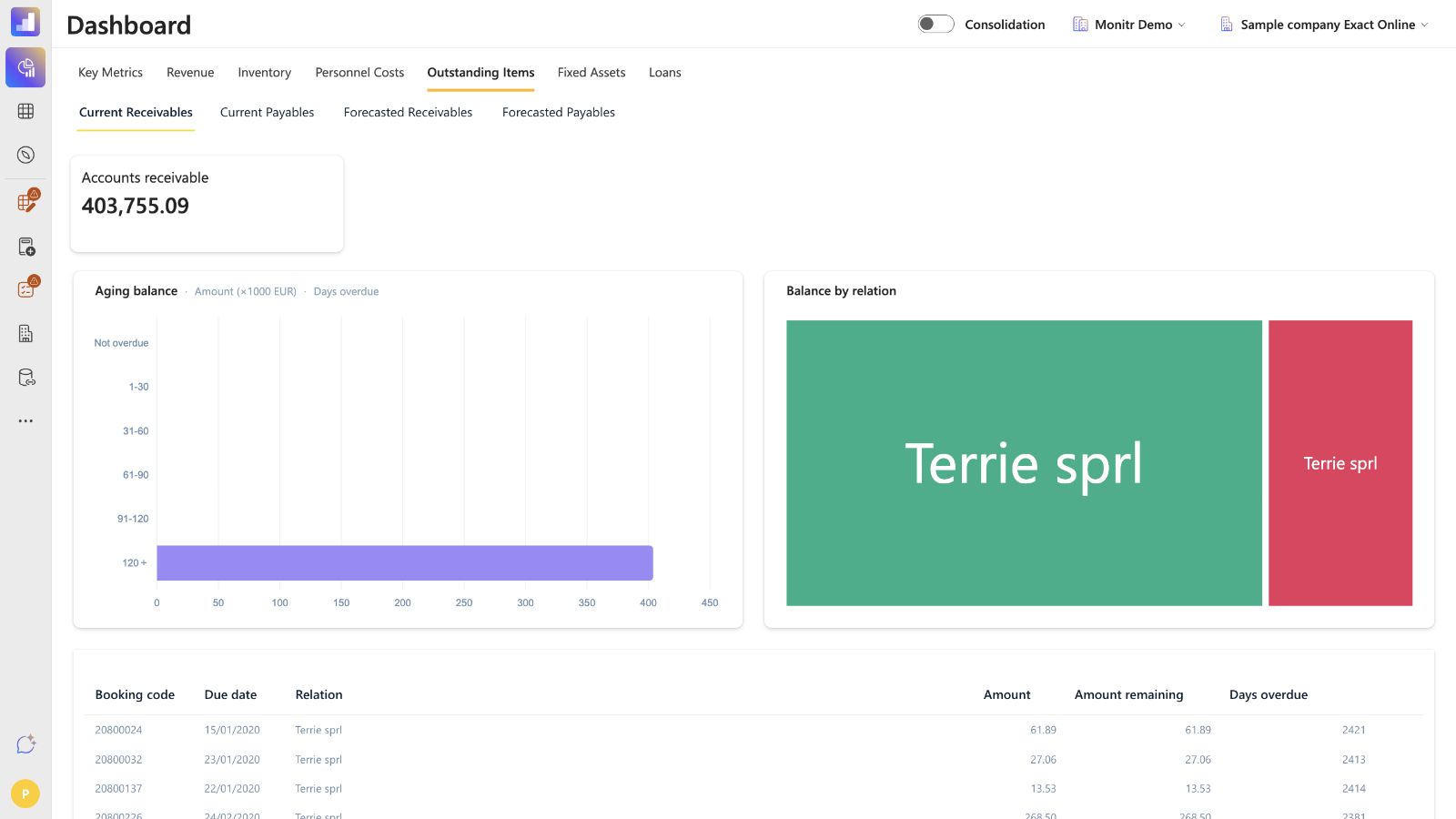 Screenshot — Current Outstanding Items dashboard
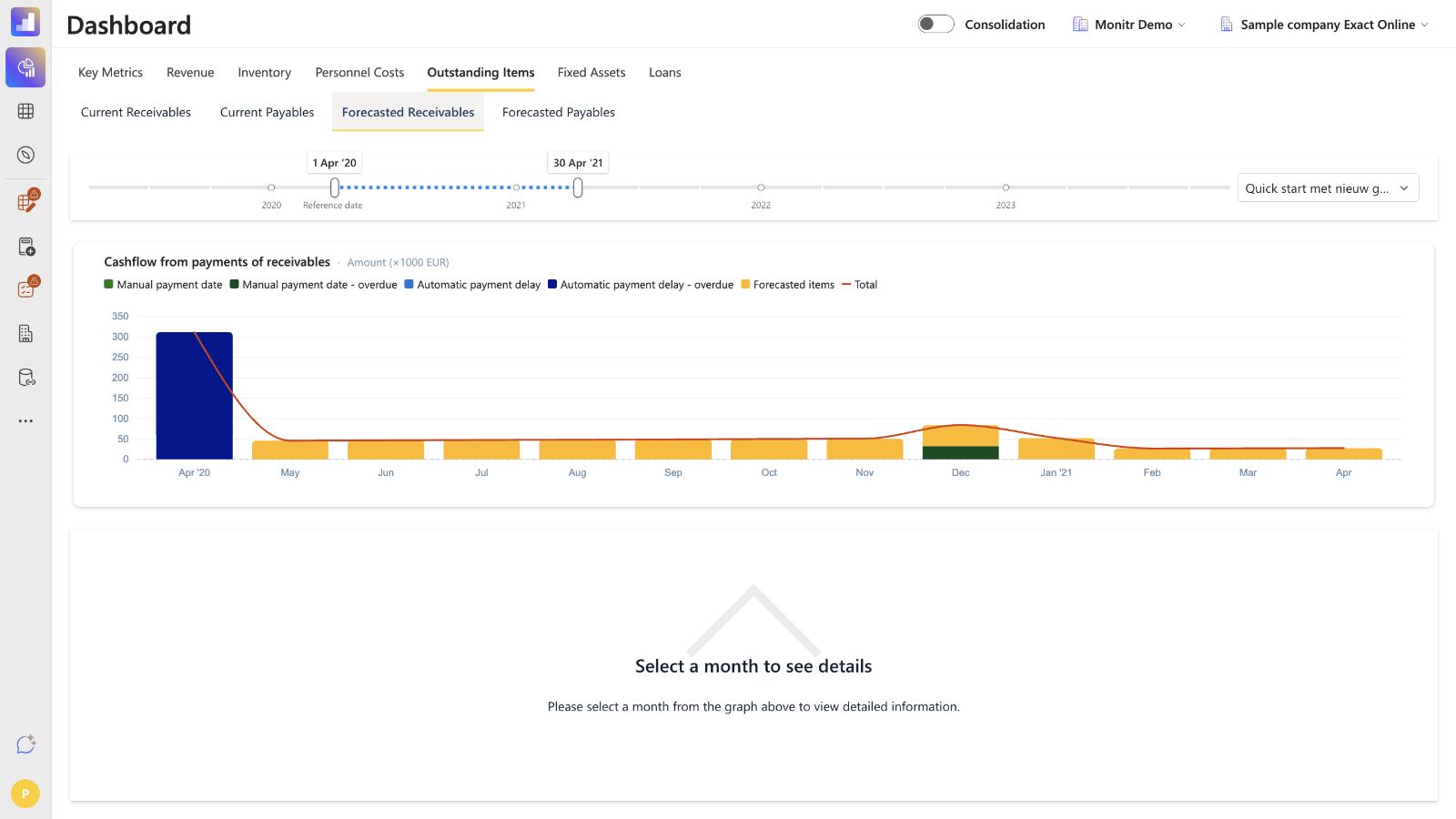 Screenshot — Forecasted Outstanding Items dashboard
Glossary
| Term | Meaning |
|---|---|
| Outstanding item | An invoice with an unpaid remaining balance at a selected snapshot date. |
| Receivable | Amount expected from a customer. |
| Payable | Amount expected to be paid to a supplier. |
| Reference date | Snapshot date used to select current open invoices. |
| Last Date Actuals | Last date covered by actual accounting data; overdue timing starts after this point. |
| Not overdue | Due date is after the reference date. |
| Overdue | Due date is on or before the reference date. |
| Automatic unwinding | Payment timing generated from a percentage distribution. |
| Manual unwinding | Payment timing based on a specific assigned invoice payment date. |
| Forecasted item | Future receivable or payable generated from a forecast budget account. |
| Payment delay | Number of months between a forecast period and expected payment. |